
Is Otter AI worth it? A 6-month test across 100+ real meetings covering transcription accuracy, the visible bot, the BIPA lawsuit, and better bot-free options.
TL;DR: Otter AI Review 2026
- Otter is a strong transcription archive, with accurate transcripts, searchable meeting history, and real-time captions. Pro is $16.99/month, or $8.33/month billed annually, and the free plan gets 300 monthly minutes. Pricing re-verified September 2026.
- The limits are structural, not fixable in settings. OtterPilot joins your call as a visible bot, and every insight arrives after the meeting ends.
- Privacy is the open question, with an August 2025 class action over consent, and de-identified conversation data usable for model training on lower tiers.
- If your calls are sales calls, the bot and the after-the-fact timing are the dealbreakers. Convo is the best alternatives that works live with nothing joining the meeting.
My Experience Testing Otter AI
Six months ago, I was looking for a meeting transcription tool that could keep up with my schedule. Running 15-20 calls per week across Zoom, Google Meet, and Microsoft Teams, I needed something reliable, and Otter.ai was the obvious first choice. It's one of the most recognized names in AI transcription with over 10 million users.
After six months and hundreds of meetings, I have a clear picture of what Otter does exceptionally well, where it falls short, and whether it's actually worth the price in 2026. This Otter AI review covers everything, including transcription quality, pricing, privacy concerns, the recent lawsuit, and honest alternatives. No affiliate links, no sponsorship, just what I actually experienced.
I also compare Otter directly against Convo, the bot-free alternative I've been working on. Most of my issues with Otter weren't about transcription quality (Otter is excellent at that). They were about what happens during the meeting itself, which Otter doesn't address at all and which is exactly where real-time conversation intelligence earns its keep.
Want the short answer?
Otter is a good archive of what was said. Convo helps while it's being said, handing you the answer before the moment passes. The first 7 days are free.
What Is Otter AI?
Otter AI is an AI meeting assistant that records, transcribes, and summarizes your conversations, then makes every one of them searchable afterward. Otter.ai was founded in 2016 by Sam Liang (former VP at Google and Motorola), was one of the first consumer AI transcription tools, and has grown to over 10 million users across professionals, students, and enterprise teams.
The core promise is to join your meetings automatically, transcribe everything in real-time, and give you searchable, shareable meeting notes with AI-generated summaries.
Key features include:
- Real-time meeting transcription with live captions
- AI-generated summaries, action items, and key topics
- Searchable meeting library across all your conversations
- Speaker identification and attribution
- OtterPilot, automated meeting assistant that joins calls
- Otter AI Chat, ask questions about your meeting content
- Integrations with Zoom, Google Meet, Microsoft Teams
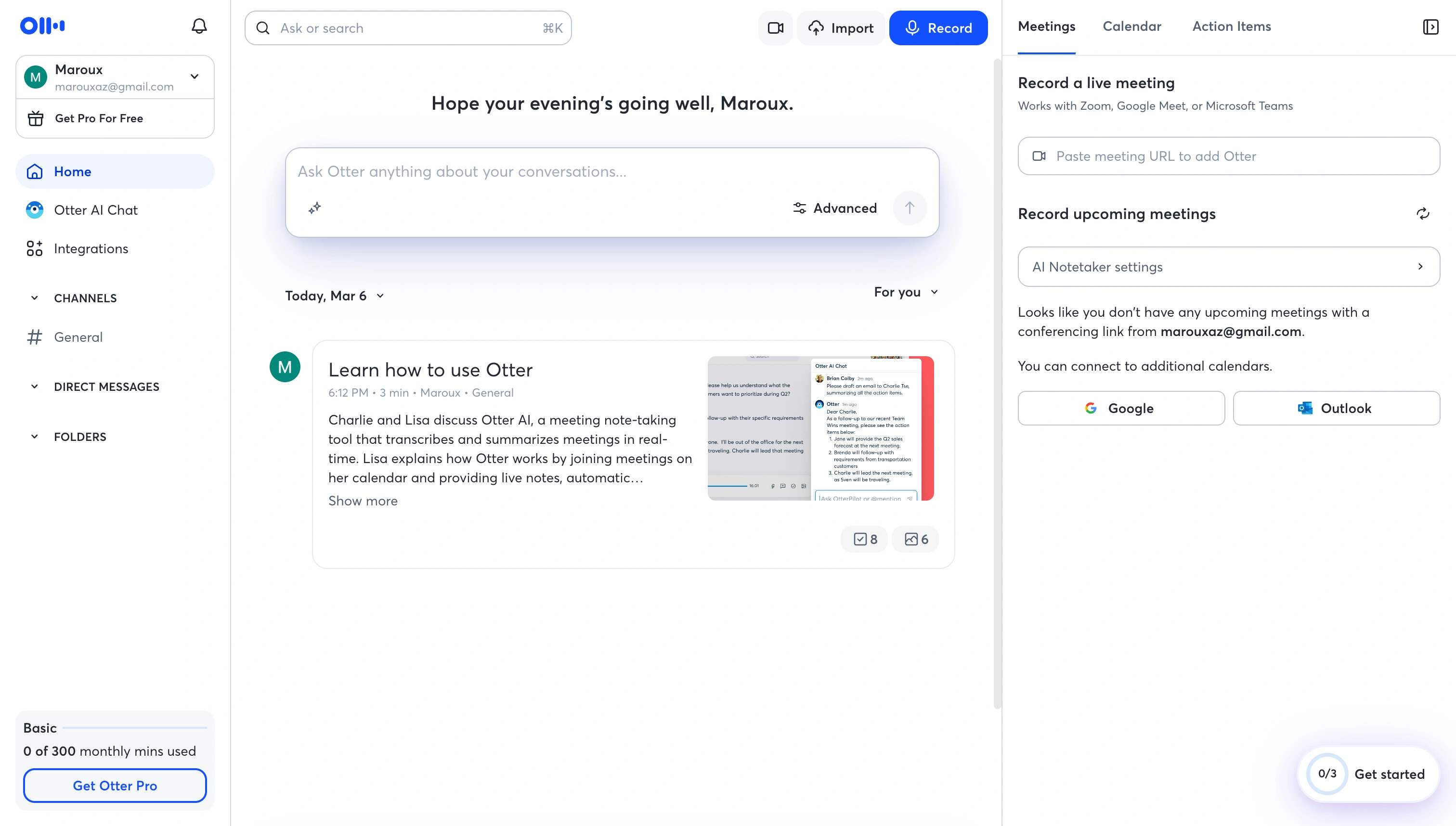
Otter.ai's meeting dashboard, the searchable transcript library is its standout feature
How I Tested It
I used Otter.ai as my primary transcription tool for six months across:
- Client discovery and sales calls on Zoom and Google Meet
- Weekly team syncs on Microsoft Teams
- 1:1 meetings with my co-founder
- Customer onboarding calls
- External partnership discussions
I compared transcription accuracy by manually checking segments against recordings, tested search across 200+ meetings, and tracked how often summaries accurately captured key decisions. This isn't a quick trial, it's what happens when you depend on the tool for real work.
Otter AI Transcription: Accuracy, Languages, and Speed
Transcription is the reason to buy Otter, so it is worth being specific about how good it actually is.
Accuracy. Across six months and 200+ meetings I spot-checked transcripts against the recordings by hand. In clean audio with one person speaking at a time, Otter landed around 93-95%, the highest I have measured in a consumer tool. It falls off in the usual places, like background noise, three or more people talking over each other, heavy accents, and dense technical vocabulary. For a plain business call the output is clean enough to send to a client without editing. For a noisy panel or a fast technical review, expect to spend time correcting it.
Speaker labels. After two or three meetings of training, Otter attributed lines to the right person roughly 85% of the time. Diarization is one of the harder problems in the field, and Otter handles it better than most, though it slips once a call gets crowded.
Languages. Otter transcribes six languages, English, Spanish, French, German, Japanese, and Chinese (Simplified), confirmed on Otter's own support page in September 2026. English is where the accuracy figures above hold. Within English it reads a wide range of accents (American, British, Indian, Irish, Scandinavian, and more), but if your team works day to day in a language outside those six, Otter is not the tool for you yet.
Speed. The transcript is live. Words appear on screen as people speak, close enough to real time to follow a fast conversation or read along when the audio is poor. That live view earns its keep, but it is display only. Otter shows you the words as they land; deciding what to do with them in the moment is left entirely to you.
On raw transcription accuracy, Otter is the stronger buy, and I won't pretend otherwise. But a perfect transcript scrolling past in real time is not the same as knowing what to say next, and that second gap is where deals are lost rather than merely recorded. Covering it is Convo's job, not Otter's.
Otter AI Pros: What I Genuinely Liked
1. Best-in-Class Transcription Accuracy
This is the single strongest reason to run Otter, and the transcription section above covers it in full, around 93-95% in clean audio, with speaker labels that mostly hold. For standard business conversations the output is clean enough to share with clients without editing.
2. Search Across All Meetings Is Excellent
This is Otter's killer feature and the reason I kept using it for months. I could search a keyword or phrase and instantly find every mention across hundreds of past meetings. When a client referenced something from a call three months ago, being able to search "Q2 timeline" and find the exact moment saved me multiple times.
For anyone who needs to reference past conversations regularly, account managers, consultants, lawyers, this feature alone can justify the subscription.

Searching across months of meetings, Otter finds every mention instantly
3. Live Transcript During Meetings
Unlike some tools that only provide transcripts after the fact, Otter shows a real-time transcript during the meeting. You can see words appearing as people speak, which is useful for following along, especially in meetings with poor audio or non-native speakers.
It also means you can highlight key moments during the call rather than hunting through the full transcript afterward.
4. Speaker Identification Works Well
After initial training (it takes 2-3 meetings), Otter correctly identified who said what about 85% of the time. Speaker diarization is one of the harder problems in transcription, and Otter handles it better than most competitors I've tested.
This matters when you're sharing meeting notes with a team, knowing who committed to what prevents the "I thought you said you'd handle that" problem.
5. Otter AI Chat Is Useful
Otter's AI Chat feature lets you ask questions about your meetings in natural language. "What did Sarah say about the budget?" or "Summarize the action items from last Tuesday's call." It's like having a searchable memory of every conversation you've ever had.
For someone managing multiple client relationships, this is more efficient than scrolling through transcripts manually.
Otter AI Cons: Where It Falls Short
1. The Bot Is Visible to Everyone
This is my biggest frustration with Otter, and it's the same problem I found with Fireflies and Fathom. OtterPilot joins your meeting as a visible participant, everyone sees "Otter.ai" in the participant list.
I've had clients ask about it. I've had prospects comment on being recorded in a way that shifted the conversation's tone entirely. For sensitive discussions, relationship-building calls, or any situation where you don't want recording to be the focus, the visible bot creates real friction.
For a bot-free approach that stays completely invisible to other participants, you need a fundamentally different architecture.
Convo takes that different architecture. Audio is captured directly from your Mac's output, so nothing joins the meeting from the outside. No "OtterPilot" participant in the attendee list. Clients can't tell, prospects don't comment on it.
Bot-free capture on Mac
Convo records and transcribes without a bot joining your meeting. Try Convo free for 7 days.
2. No Help During the Meeting
Otter transcribes beautifully. But when a prospect hit me with a pricing objection I wasn't prepared for, Otter just faithfully recorded my stumbling response. When I forgot context from a previous call with the same client, Otter had it somewhere in its archive, but I didn't know that until after the meeting when I searched for it.
The insight arrives too late. If you struggle during calls (not with remembering afterward, but with performing in the moment), transcription alone doesn't solve that problem.
This is the gap Convo was built to close. Convo analyses your conversation every eight seconds and shows suggested responses in a panel only you can see. When a prospect raises a pricing objection, you get an objection-handling suggestion before you have to come up with one. When you forget what was discussed last week with the same client, the relevant snippet surfaces in the sidebar without you searching for it. The help arrives during the call, not in the email afterward.
3. All Audio Is Uploaded to the Cloud
Otter processes all audio on its cloud servers. Every conversation, every sensitive discussion, every confidential negotiation, uploaded to third-party infrastructure for processing. For some industries (healthcare, legal, finance), this is a compliance issue. For others, it's simply a question of how much you trust third-party data handling.
Otter does hold security certifications (more on this below), but the fundamental architecture means your audio leaves your device. Some organizations have policies against this, and I've had clients specifically ask me not to use cloud-based recording tools.
Convo's architecture is different at the capture layer. Audio is taken from your Mac's output rather than routed through a meeting bot on the platform's side. The data handling and retention details are documented on the Convo privacy page, and the bot-free capture model removes the consent complications that come with a visible Notetaker joining the meeting.
4. Pricing Adds Up Quickly
At $16.99/month for individuals or $30/user/month for Business teams, Otter is one of the more expensive transcription tools. When competitors like Fireflies offer Pro plans at $10/user/month and Fathom offers unlimited free transcription for individuals, Otter's pricing feels steep.
The value is there if you use search heavily. But if you primarily need transcripts and summaries, cheaper alternatives exist. See our Otter AI pricing breakdown for a detailed comparison.
Convo's Starter plan is $29.99/month, a step up from Otter Pro at $16.99/month. The premium over the transcription tools is real, but the value calculation is different. Convo includes real-time in-call help, cross-meeting memory, and document upload that none of the three transcription tools offer at any price.
5. Free Tier Is Too Limited
Otter's free plan gives you 300 minutes per month with a 30-minute per-conversation limit. Compare that to Fireflies (unlimited transcription, 400 minutes of team storage) or Fathom (unlimited free for individuals). If you're having more than a few meetings per week, you'll hit Otter's free limit fast, and a 30-minute cap per call means most business meetings get cut off.
The free tier feels designed to push you toward paid rather than provide genuine standalone value. For a realistic free option, Fathom is significantly more generous.
Convo runs a 7-day free trial with full Starter functionality (real-time suggestions, cross-meeting memory, bot-free capture). That's enough time to feel whether the in-call help actually changes your meeting outcomes before committing to a subscription.
What Reddit Users Actually Say About Otter
The Reddit threads on Otter read rougher than the review sites. In the most direct "Is Otter.AI worth it?" thread (r/ProductManagement, November 2023), the asker had spotted the trend before the replies even arrived:
> "Their service went through a 'shrinkflation'. You're getting less monthly minutes allowance for what you pay for compared to the past."
The top reply is blunter. "It sucks and never captured any transcripts." A more measured user lands where several threads do, saying Otter "has fallen pretty behind in terms of the quality of the notes" and pointing people to Fireflies or Fathom instead. Not everyone piles on; one product manager keeps it around for customer interviews. But the pattern across threads matches this review's cons list, with value shrinking at the price and quality slipping against newer tools.
The other recurring Reddit objection is the bot. In r/sales (June 2024), a rep shopping for exactly this category writes, "I don't want something automatically joining every single Teams call I get on." That objection has no fix inside Otter. It is the reason Convo captures audio locally with nothing joining the call, so you keep the transcript without changing how the prospect behaves.
Otter AI Pricing [2026]
| Plan | Monthly Price | Annual Price | Minutes | Per-Call Limit | Key Features |
|---|---|---|---|---|---|
| Basic | Free | Free | 300/month | 30 min | Basic transcription |
| Pro | $16.99/month | $8.33/month | 1,200/month | 90 min | Custom vocabulary, advanced search |
| Business | $30/user/month | $19.99/user/month | 6,000/month | 4 hours | Admin controls, team management |
| Enterprise | Custom | Custom | Unlimited | Unlimited | SSO, dedicated support, HIPAA |
Who Should Use Otter AI?
Otter is a good fit if you:
- Need searchable archives across months of meetings
- Value best-in-class transcription accuracy above all else
- Want real-time captions during meetings
- Don't mind visible meeting bots
- Use Zoom or Google Meet primarily
- Need speaker identification and attribution
Otter is NOT a good fit if you:
- Need help during meetings, not just documentation after
- Have privacy-sensitive calls (legal, medical, financial)
- Find visible meeting bots intrusive or inappropriate
- Are price-sensitive (cheaper and free alternatives exist)
- Want real-time help or response suggestions
- Need to work invisibly without participants knowing
Otter vs Convo: Side by Side
After testing Otter extensively, I compared it directly against Convo across the dimensions that actually matter for daily meeting work.
| Dimension | Otter.ai | Convo |
|---|---|---|
| Capture model | Bot joins meeting (visible to all) | Bot-free, captured from your Mac |
| Real-time in-call help | No | Yes, 8-second analysis loop |
| Cross-meeting memory | Searchable archive after the call | Live context surfacing during the call |
| Document upload | No | Yes (sales decks, pricing sheets, briefs) |
| Transcription accuracy | 93-95% (best in class) | Comparable, with speaker diarization |
| Platform coverage | Zoom, Meet, Teams | Zoom, Meet, Teams, Webex, Slack Huddles, anything with audio |
| Free tier | 300 min/month, 30-min per call | 7-day full trial |
| Pricing (entry) | $16.99/mo Pro | $29.99/mo Starter |
| AI Chat over meetings | Yes (Otter Chat) | Yes (Cmd+Enter mid-call or post-call) |
| Best for | Searchable archives + transcript quality | Real-time help + memory + bot-free Mac calls |
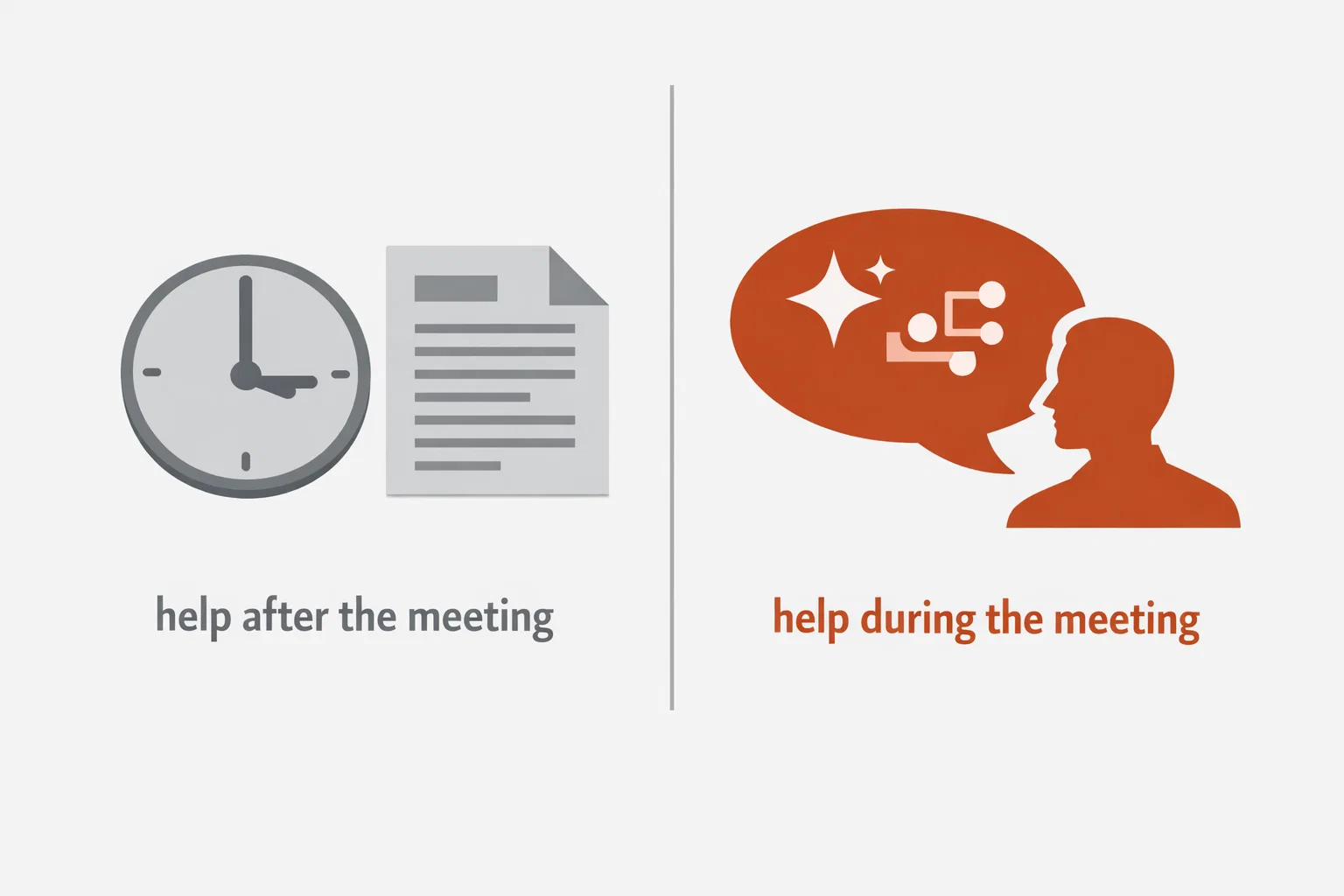
Two different approaches. Otter documents after the meeting, Convo helps during the meeting
For the wider category, see Otter vs Fireflies vs Fathom, the Fathom alternatives roundup, or the best AI note-taking apps ranked for 2026.
Is Otter AI Safe?
This is one of the most-searched questions about Otter, and the answer is nuanced.
On the technical side, Otter is solid:
- SOC 2 Type II certified
- Data encrypted with AES-256 at rest and TLS in transit
- GDPR compliant with data processing agreements available
- HIPAA compliant (Enterprise plan with BAA)
- ISO 27001 certified
That's a strong set of certifications, and Otter takes infrastructure security seriously.
But there are important considerations:
The cloud processing reality. Every meeting recorded through Otter is uploaded to their cloud servers for processing. If you're in an industry with strict data handling requirements, or if you simply prefer that your conversations stay on your own device, this is a fundamental architectural concern, not a configuration issue.
The BIPA lawsuit. In August 2025, a federal class-action lawsuit was filed against Otter.ai (Brewer v. Otter.ai, Northern District of California). The lawsuit alleges that Otter "deceptively and surreptitiously" recorded private conversations and used the data to train its AI models. NPR covered the story. The case specifically targets how Otter records people who never consented to using the service, if someone in your meeting had Otter enabled, your voice was processed without your agreement.
Consent in two-party states. Twelve U.S. states require all-party consent before recording a conversation. Those states are California, Florida, Illinois, Maryland, Massachusetts, Michigan, Montana, New Hampshire, Pennsylvania, Washington, Delaware, and Connecticut. When Otter's bot joins a meeting, everyone is being recorded, but only the person who set up Otter agreed to the terms of service. This creates legal exposure, particularly in California under CIPA.
University bans. Major institutions including Cornell University, the University of Oxford, and the University of Cambridge have blocked or restricted AI meeting bots including Otter due to privacy concerns. Tufts University blocks unapproved AI bots from both Zoom and Microsoft Teams.
For industries dealing with sensitive conversations, legal, healthcare, financial, or for anyone operating in all-party consent states, it's worth evaluating whether cloud-based recording aligns with your compliance requirements. Bot-free alternatives that process audio locally offer a fundamentally different risk profile.
Meeting Transcription Without a Bot
If the bot visibility and cloud processing concerns resonate with you, it's worth knowing that alternatives exist.
The reason Otter sends a bot into your meeting is architectural, it needs to capture audio from the platform's server side. It's the most common approach, but it comes with every trade-off I've described, like visible participants, consent complications, enterprise IT blocks, and your audio on someone else's servers.
A different approach exists, local audio capture. Instead of sending a bot into the meeting, some tools capture audio directly from your device's audio output. No bot joins the meeting. No one else sees anything. The audio is processed on your machine.
This matters for two reasons:
- Consent simplifies dramatically. You're capturing what you hear on your own device, like taking notes. No bot means no awkward participant in the meeting, no corporate IT blocking, no compliance headaches in two-party consent states.
- Your audio stays on your machine. Instead of being uploaded to third-party servers, processing happens locally. For anyone dealing with sensitive conversations, this is a fundamentally different privacy model.
Convo takes this approach. Audio is captured directly from your Mac, no bot joins your calls, and you get meeting notes without anyone knowing you're using AI assistance.
The architectural difference matters. Every tool that puts a bot in the call shares the same fundamental consent and visibility issues. The bot-free side is a different category, not a different SKU.
What Convo Does Instead
After six months with Otter and the realization that documentation wasn't my actual problem, I started using Convo (the meeting tool Markus and I have been building). Here's what it does that Otter doesn't.
Real-time suggestions during the call. Convo analyses your conversation every eight seconds and shows you suggested responses in a floating panel that's visible only to you. Other participants see nothing. When a prospect raises a pricing objection, you get an objection-handling suggestion. When a candidate gives a vague answer, you get a follow-up question. The panel adapts to the type of conversation it detects (discovery, objection handling, negotiation, technical Q&A). You can also press Cmd+Enter mid-call and type any question, and the answer comes from your live transcript, your past meetings, or your uploaded documents.
Cross-meeting memory in the live call. Otter has the best searchable archive in the category, but you have to search it after the meeting ends. Convo brings the relevant moment from past meetings into the current call as it's happening. When a client says "you mentioned X last time," I see the exact sentence I said without opening anything. When a prospect brings up the same objection they raised three calls ago, the previous response and how it landed surfaces in the sidebar automatically.
Document upload. You upload your sales decks, pricing sheets, product specs, or competitive briefs, and Convo references them during the meeting. When a prospect asks about pricing, the answer comes from your uploaded sheet within a couple of seconds. None of the documentation tools in this comparison do this.
Bot-free capture on Mac. Convo captures system audio directly from your Mac. No OtterPilot equivalent in the participant list, no client commenting on the bot, no IT department blocking the recording assistant.
Conversation analytics. Talk-to-listen ratios, topic tracking, and team-level coaching insights, included in Convo's Professional tier.
Try Convo free for 7 days
Real-time help, cross-meeting memory, bot-free Mac capture, document upload. Download Convo →
My Honest Verdict
Otter.ai is the gold standard for meeting transcription accuracy and search. If your primary need is "I want perfect records of every meeting I've ever had, and I want to search across all of them", Otter delivers. The transcription quality is genuinely the best I've tested, the search functionality is worth the premium if you use it daily, and Otter AI Chat adds another layer of usefulness.
But it's not a complete solution. The visible bot creates friction in sensitive conversations. The cloud processing may not meet your compliance requirements. The pricing is higher than alternatives offering comparable transcription. And most importantly, like every transcription tool, it helps you remember what happened, not perform better when it mattered.
My recommendation: If meeting archives and search are your priority, Otter Pro at $8.33/month (annual billing) is worth it. Test the free tier first, and be honest about whether your real problem is documentation or performance.
For everyone whose calls are the actual product (sales reps, customer success managers, recruiters, consultants, founders), Convo is the better tool. Real-time suggestions during the call, cross-meeting memory that surfaces context as the conversation happens, document upload that lets Convo answer client questions from your own materials, and bot-free capture on Mac. The 7-day free trial is enough time to feel the difference before committing.
For more comparisons, see our Otter vs Fireflies vs Fathom breakdown or browse all meeting assistant alternatives.
Pick the tool that helps you during the call
Real-time AI help, bot-free capture, cross-meeting memory, document upload. Try Convo free for 7 days. Side by side, Convo vs Fireflies.
Frequently Asked Questions
Is Otter AI worth it? For meeting transcription and searchable archives, yes, Otter is one of the best in class. The Pro plan at $8.33/month (annual billing) delivers excellent value if you regularly need to search past meetings. If you mainly need basic transcription without search, free alternatives like Fathom or Fireflies' free tier may be enough. If you need real-time help during calls, Otter won't solve that problem.
Is Otter AI accurate? Yes, Otter offers some of the best transcription accuracy available at 93-95% in good audio conditions. Accuracy drops with background noise, multiple people talking simultaneously, heavy accents, or poor microphone quality. Speaker identification is about 85% accurate after initial training. Always review transcripts before sharing with clients or externally.
Is Otter AI safe? Technically, yes, Otter holds SOC 2 Type II, ISO 27001, and GDPR certifications with AES-256 encryption. However, all audio is uploaded to cloud servers for processing, a federal class-action lawsuit (Brewer v. Otter.ai) was filed in August 2025 alleging unauthorized recording and AI model training, and the visible bot creates consent complications in 12 two-party consent states. For privacy-critical work, consider tools that process audio locally.
Is Otter AI free? Otter has a free plan with 300 transcription minutes per month and a 30-minute per-conversation limit. For comparison, Fireflies now offers unlimited transcription free with 400 minutes of team storage, and Fathom offers unlimited free transcription for individuals. Otter's free tier is the most limited of the major transcription tools.
Does Otter AI join meetings as a bot? Yes. OtterPilot joins your meeting as a visible participant called "Otter.ai." All attendees can see it in the participant list and are notified that recording is active. Some people find this intrusive, and it can change the tone of sensitive conversations. If you prefer invisible recording, bot-free alternatives exist.
Can Otter AI transcribe in real-time? Yes, Otter shows a live transcript during the meeting as people speak. This is one of its genuine strengths. However, it's purely a transcription display, it doesn't provide suggestions, coaching, or real-time assistance based on what's being discussed.
What's the best Otter AI alternative? It depends on your priority. For free transcription, pick Fathom. For CRM integration, Fireflies. For privacy and bot-free recording, Convo. For enterprise revenue intelligence, Gong. See our full comparison for a detailed breakdown.
Can Otter AI record phone calls? Not from the call line itself. Otter's mobile app records through the phone's microphone, so a call on speakerphone gets transcribed, but there is no native integration that captures the call audio directly. For desktop calls on Zoom, Meet, or Teams, Convo captures system audio on the device with nothing joining the call.
What happens to your data on Otter's plans? Recordings and transcripts stay in your workspace until you delete them. On the free and Pro tiers, Otter's terms permit de-identified conversation data to be used to improve its models, with an opt-out in settings; Business adds admin controls. The consent questions raised by the 2025 lawsuit are covered above. If your compliance bar is that audio never leaves the device, that is Convo's model.
Has Otter AI been sued? Yes. In August 2025, a federal class-action lawsuit (Brewer v. Otter.ai) was filed in the Northern District of California alleging that Otter "deceptively and surreptitiously" recorded private conversations and used the data to train AI models. The case is ongoing. Competitor Fireflies was also sued in December 2025 under Illinois' Biometric Information Privacy Act (BIPA) for collecting voiceprint data without written consent.
What do Reddit users say about Otter.ai? Rougher things than the review sites do. The recurring themes across threads are shrinking value ("you're getting less monthly minutes allowance for what you pay for compared to the past"), note quality falling behind newer tools, and the visible bot, with one r/sales rep writing he doesn't want "something automatically joining every single Teams call I get on." Fans remain for interview transcription. If the bot objection is yours too, Convo records locally with nothing joining the call and coaches you live while it listens.

Iván is the co-founder of Convo, focused on operations and growth. Background in marketing and sales. Knows firsthand what it feels like when a conversation doesn’t go the way it should.
Ready to transform your meetings?
Join professionals using Convo to feel confident in every conversation.
Get StartedCONTINUE READING