

Markus Kellermann Founder & CEO
Convo vs Fireflies 2026: Which AI Meeting Assistant Wins?
Markus Kellermann Founder & CEO
Fireflies documents the call. Convo helps you win it. I tested both on real calls for months and one architectural difference changes everything which one you actually need.
TL;DR: Convo vs Fireflies in 2026
- Convo and Fireflies aim at opposite jobs. Fireflies documents the call after it ends. Convo helps you perform in the call while it's still happening.
- Fireflies is the CRM workhorse. It joins with a visible bot, transcribes, and logs everything to Salesforce or HubSpot, and it's cheaper at $10/user/month.
- Convo captures the call locally with no bot, helps you live while you're still talking, then drafts the follow-up. Fireflies can't do the live part at all.
- For anyone whose meetings are where deals are won and not just logged, Convo is the better pick. Choose Fireflies if automatic CRM logging is the main job. Try Convo free.
The Quick Comparison
| Feature | Convo | Fireflies.ai |
|---|---|---|
| Best For | Real-time meeting help | Meeting documentation + CRM |
| Bot Joins Meeting? | No (invisible) | Yes (visible participant) |
| Real-Time Help | Yes | No |
| Audio Processing | Local (your device) | Cloud (Fireflies servers) |
| Transcription | Good | Very Good |
| CRM Integration | No | Excellent (Salesforce, HubSpot) |
| Free Tier | 7-day trial | 400 min transcription + storage |
| Starting Price | $22.49/month | $10/user/month |
| SOC 2 Certified | Not yet | Type II |
Why This Comparison Matters
This comparison keeps coming up because Fireflies is one of the most popular AI meeting assistants with 300,000+ users, and people searching for alternatives often land on Convo. I wrote a detailed Fireflies review earlier this year that became our most-read blog post, which tells me people genuinely want to understand the differences between these tools.
I'll lay out exactly where Fireflies wins, where Convo wins, and let you decide based on your actual needs.
How I Compared Them
I used Fireflies extensively for three months before building Convo. In fact, frustrations with the bot-based model were part of what inspired us to build something different. Here's what I tested.
- 50+ sales calls on Zoom and Google Meet
- Team syncs on Microsoft Teams
- Client onboarding and check-in calls
- Sensitive discussions where privacy mattered
- Calls where I needed real-time help vs. just documentation
I compared transcription quality, workflow integration, participant reactions, privacy architecture, and, most importantly, whether each tool actually helped me do better work.
Convo: Real-Time Help During Meetings
Convo is built around a fundamentally different idea than Fireflies. Instead of documenting what happened after the meeting, it helps you perform better during the meeting.
How it works. Convo runs locally on your Mac or Windows machine alongside your call. It captures audio from your device's output—no bot joins the meeting. While you're talking, it provides real-time suggestions, context reminders, and coaching on your screen. After the call, you get a summary with action items.
Where Convo Wins
1. Real-time help during calls. When a prospect asks a question you didn't prepare for, Convo suggests responses based on the conversation context. When you forget what was discussed three meetings ago with this client, Convo surfaces the relevant context. This is help in the moment. A summary that arrives after the call is too late.
Ready to try it yourself?
Get Started2. No bot joins your meeting. This is the core architectural difference. Nobody in your meeting sees anything, no "Convo Notetaker" in the participant list, no recording notification triggered by a third party joining. For sensitive conversations, client calls, or any situation where you don't want recording to be front-and-center, this changes everything.
3. Local audio capture. Your meeting audio is captured on your device and no bot joins the call. It's sent only to our transcription provider, which deletes it right after processing and never uses it to train models. For industries with strict data handling requirements (legal, healthcare, finance) or for anyone who simply prefers keeping conversations private, this is a fundamentally different privacy model. Convo uses AES-256 encryption and is GDPR compliant.
4. Broader platform support. Convo works on Zoom, Google Meet, Microsoft Teams, Slack Huddles, and Webex. Because it captures audio from your device rather than joining as a meeting participant, platform support is inherently more flexible.
5. Completely invisible operation. Beyond just "no bot," Convo is entirely invisible to other participants. No notifications, no participant list entries, no consent pop-ups from a third-party tool joining. You're simply taking notes.
Where Convo Falls Short
No CRM integration. If your workflow depends on automatic meeting notes pushed to Salesforce or HubSpot after every call, Convo doesn't do this today. Fireflies has a clear advantage here for sales teams with CRM-centric workflows.
No meeting library search. Convo doesn't build a searchable archive across hundreds of past meetings the way Fireflies does. If you need to search "what did we discuss about pricing in that call three months ago," Fireflies and Otter are better suited.
No free tier. Convo offers a 7-day free trial, but there's no permanent free plan. Fireflies' free plan covers 400 minutes of transcription and storage. If budget is a hard constraint, that matters.
Desktop only. Convo is a Mac and Windows desktop application. If you need a fully web-based solution or mobile support, Fireflies is more accessible.
Fireflies: Best-in-Class Meeting Documentation
Fireflies.ai is one of the most established AI meeting assistants, with deep integrations and a strong feature set for teams—especially in sales.
Where Fireflies Wins
1. CRM integration is best-in-class. Fireflies automatically pushes meeting notes, action items, and call summaries to Salesforce, HubSpot, Pipedrive, and other CRMs. For sales teams where "call happened -> notes in CRM -> follow-up triggered" is the core workflow, this eliminates manual data entry entirely. I saved 10-15 minutes per call when I connected HubSpot.
2. Conversation analytics. Talk-to-listen ratios, sentiment analysis, topic tracking. Fireflies provides data that helps sales managers coach their teams. (For a deeper look at this category, see our guide to conversation intelligence.) I found it genuinely useful to discover I was talking 82% of the time in discovery calls. That insight changed how I approached sales conversations.
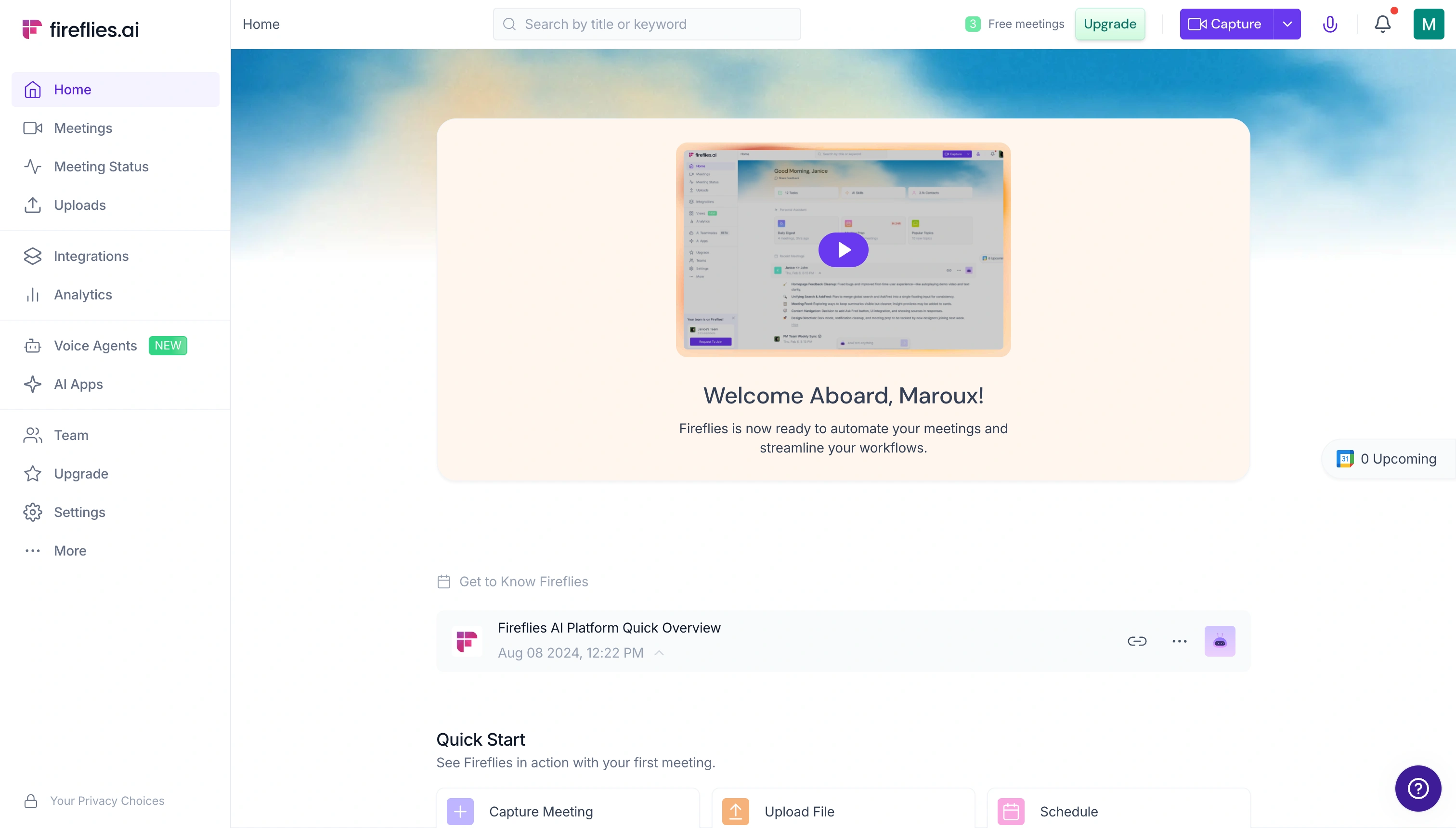
Fireflies' dashboard. CRM integration and conversation analytics are its strongest features
3. Generous free tier. 400 minutes of transcription and storage is enough for most individuals to use Fireflies meaningfully without paying. This makes it low-risk to try and usable for light meeting loads.
4. Team collaboration. Shared meeting libraries, collaborative notes, team workspaces—Fireflies is built for teams sharing meeting intelligence. If multiple people need access to the same call recordings and notes, Fireflies handles this well.
5. Searchable meeting library. Like Otter, Fireflies builds a searchable archive of all your meetings. Search across conversations, filter by date or participant, and find specific moments. Valuable for account managers juggling many concurrent relationships.
Where Fireflies Falls Short
The bot joins every meeting. "Fireflies.ai Notetaker" appears as a visible participant. This is the architectural trade-off. Fireflies needs to join the meeting to capture audio server-side. I've had prospects change their tone when they noticed the recording bot. Read more in my full Fireflies review.
No real-time help. Fireflies records and analyzes after the fact. When you're struggling mid-call with a tough question, Fireflies captures the struggle faithfully—it doesn't help you through it.
Cloud processing raises privacy concerns. All audio is uploaded to Fireflies' servers for processing. This has led to a class-action BIPA lawsuit filed in December 2025 and bans by universities including Cornell, Oxford, and Cambridge.
Summaries are inconsistent. In my testing, AI-generated summaries were hit-or-miss. Sometimes they captured key points perfectly. Other times, they missed important context. Action items were particularly unreliable. Fireflies often misidentified who was responsible for what.
Head-to-Head: Feature Comparison
| Feature | Convo | Fireflies |
|---|---|---|
| Meeting transcription | Yes | Yes |
| AI summaries | Yes | Yes |
| Action items | Yes | Yes |
| Real-time help | Yes | No |
| Real-time suggestions | Yes | No |
| Bot-free (invisible) | Yes | No |
| Local audio processing | Yes | No |
| CRM integration | No | Yes |
| Conversation analytics | No | Yes |
| Team meeting library | Basic | Advanced |
| Search across meetings | Basic | Advanced |
| Video recording | No | Yes |
Head-to-Head: Pricing
| Plan | Convo | Fireflies |
|---|---|---|
| Free | 7-day trial | 400 min transcription + storage |
| Starter / Pro | $22.49/month | $10/user/month |
| Pro / Business | $52.49/month | $19/user/month |
| Annual discount | Yes (prices above are annual) | Yes |
Head-to-Head: Privacy and Security
| Aspect | Convo | Fireflies |
|---|---|---|
| Audio processing | Local capture, no bot | Cloud (Fireflies servers) |
| Bot joins meeting | No | Yes |
| SOC 2 Type II | Not yet | Yes |
| GDPR compliant | Yes | Yes |
| AES-256 encryption | Yes | Yes |
| HIPAA compliant | By architecture | Enterprise plan |
| Consent model | Local capture (like notes) | Third-party bot (requires disclosure) |
| BIPA lawsuits | None | Yes (December 2025) |
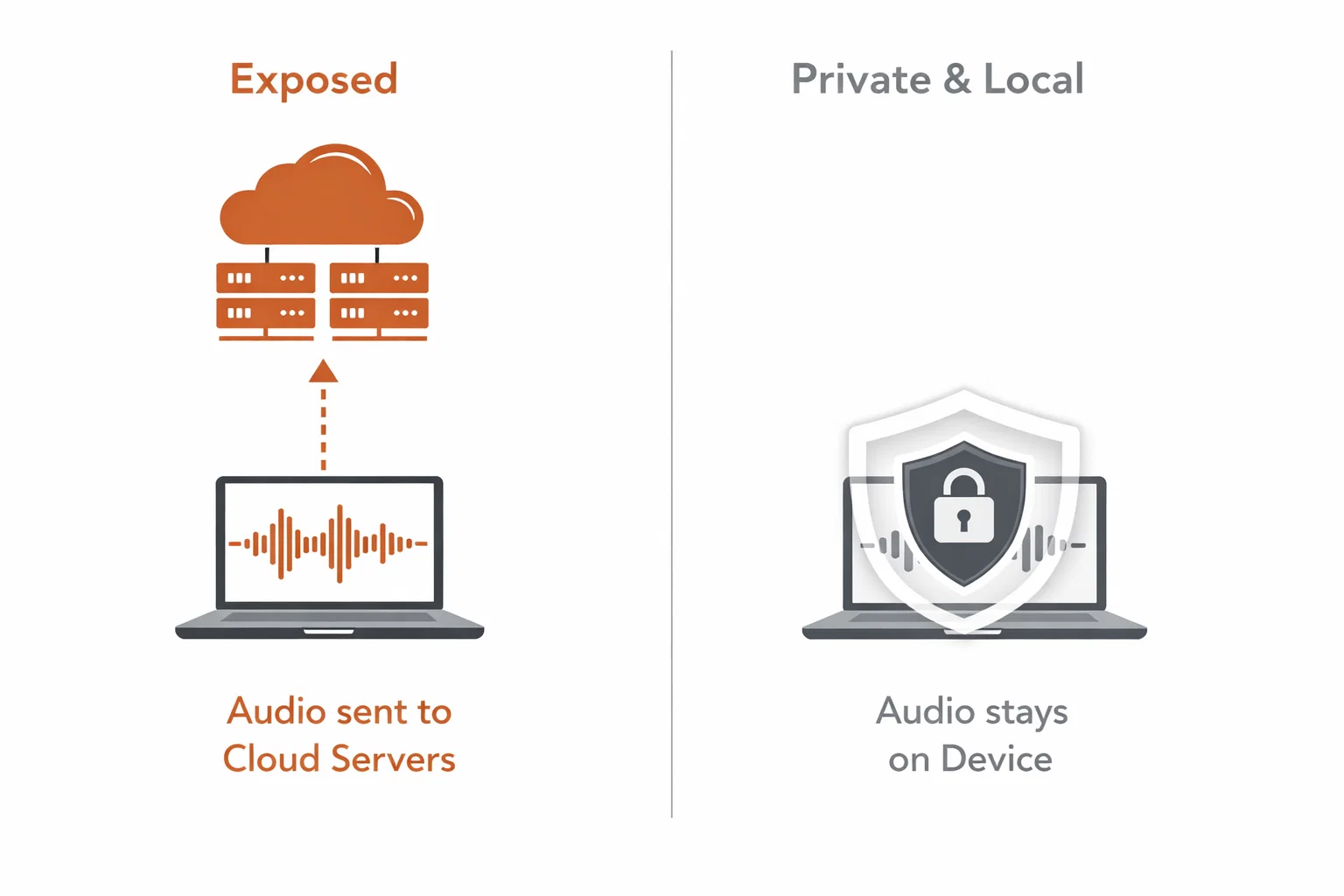
The architectural difference. Local processing vs cloud upload determines your privacy model
This is where the architectural difference matters most. Both tools hold the same security certifications, but they handle your audio in fundamentally different ways. Convo's local processing sidesteps many of the consent and compliance issues that cloud-based recording tools face.
For anyone in healthcare, legal, finance, or operating in the 12 states requiring all-party recording consent, the architecture matters more than the certifications.
Head-to-Head: Platform Support
| Platform | Convo | Fireflies |
|---|---|---|
| Zoom | Yes | Yes |
| Google Meet | Yes | Yes |
| Microsoft Teams | Yes | Yes |
| Slack Huddles | Yes | Limited |
| Webex | Yes | Limited |
| Phone calls | No | No |
| Mobile | No | Yes (web) |
Which Should You Choose?
When to choose Fireflies
- CRM automation is critical. If your workflow is "meeting -> notes in Salesforce -> follow-up email," Fireflies does this automatically and well. Convo doesn't.
- You need conversation analytics. Talk ratios, sentiment, topic tracking—Fireflies provides coaching data that's genuinely useful for sales managers.
- Budget is tight. The free tier's 400 minutes of transcription and storage is usable for individuals with light meeting loads.
- You need a searchable meeting archive. If "search across every meeting I've ever had" is a core need, Fireflies and Otter have stronger search.
- Visible recording is acceptable. In some contexts—internal meetings, sales calls with recording disclosures—the bot simply isn't an issue.
When to choose Convo
- You need help during meetings, not just after. Real-time help, response suggestions, and context reminders while you're actively talking.
- Privacy matters. Local audio capture, no bot in the meeting, and minimal retention. Critical for legal, healthcare, financial, or any sensitive conversations.
- Visible bots are a problem. Client-facing calls, relationship-building, executive meetings—situations where "Fireflies Notetaker" changes the dynamic.
- You work across many platforms. Convo's local capture works uniformly with Zoom, Meet, Teams, Slack, and Webex.
- You want to perform better, not just document more. The distinction between a documentation tool and a performance tool is the core difference.
When to use both
You're in high-stakes sales and want the best of both worlds. Convo for real-time help during the call, Fireflies for automatic CRM updates and team analytics after. They're not mutually exclusive, and they can run alongside each other without conflict.
Frequently Asked Questions
Is Convo better than Fireflies? For most people, yes. Convo helps you during the call, keeps recording private and bot-free, and still writes up the meeting after. Fireflies wins if your core need is automatic CRM logging, conversation analytics, or a big searchable archive. But if your meetings are where you actually perform, Convo is the better tool, because helping you live is the one thing Fireflies can't do.
Does Fireflies join meetings as a bot? Yes. "Fireflies.ai Notetaker" joins as a visible meeting participant. All attendees see it in the participant list and are notified that recording is active. This is how Fireflies captures audio—it's a fundamental part of its cloud-based architecture. See our full Fireflies review for details on how this affects real conversations.
Is Convo free? Convo offers a 7-day free trial with full functionality. After that, plans start at $22.49/month (Starter, billed annually) or $52.49/month (Pro, billed annually). There is no permanent free tier. See current pricing.
Which is more private—Convo or Fireflies? Convo captures audio locally with no bot joining the meeting, and the audio goes only to its transcription provider, which deletes it after processing. Fireflies uploads all audio to its cloud servers and joins meetings as a visible participant. Fireflies holds SOC 2 Type II certification; both are GDPR compliant. The architectural difference—local capture vs full cloud upload and retention—is significant for privacy-sensitive work. A class-action lawsuit was filed against Fireflies in December 2025 over biometric data collection.
Can I use both Convo and Fireflies together? Yes. Some users run Convo for real-time help during calls and Fireflies for automatic CRM updates and analytics after. They don't conflict—Convo operates locally on your device while Fireflies joins as a meeting participant. If your team needs both real-time performance help and post-call documentation, using both is a viable option.
What platforms do Convo and Fireflies support? Convo works on Zoom, Google Meet, Microsoft Teams, Slack Huddles, and Webex on Mac and Windows. Fireflies works on Zoom, Google Meet, and Microsoft Teams with limited Slack and Webex support. Fireflies also has a web app for mobile access.
Which is cheaper—Convo or Fireflies? Fireflies starts at $10/user/month (Pro) vs Convo's $22.49/month (Starter) on annual billing. Fireflies also has a free tier with 400 minutes of transcription and storage, while Convo offers a 7-day free trial. However, the tools offer different capabilities—Fireflies' price gets you transcription and CRM sync, while Convo's price gets you real-time help and local processing. Compare based on value, not just cost.
Do I need a meeting assistant at all? If you run fewer than 5 meetings per week and your conversations are routine, probably not. But if you're in sales, consulting, recruiting, or any role with frequent high-stakes conversations—and you've ever frozen on a tough question or wished you had better recall—the right tool pays for itself in the first week. The question is whether you need help during meetings (Convo) or after them (Fireflies). For a broader comparison, see our AI meeting assistant guide.
Markus is the founder of Convo, building an AI meeting assistant that automates everything after the call. Years of experience building AI products. Believes technology should help people in the moment, not just analyze the past.
Ready to transform your meetings?
Join professionals using Convo to feel confident in every conversation.
Get StartedCONTINUE READING