

Markus Kellermann Founder & CEO
Fireflies AI Review 2026: Is It Safe and Worth It?
Markus Kellermann Founder & CEO
Is Fireflies AI safe? A 3-month test on real calls covering the BIPA lawsuit, the university bans, the bot that joins your meetings, and bot-free alternatives.
TL;DR: Fireflies AI Review 2026
- Fireflies.ai does the documentation job well, and its CRM sync is the deepest in its price range. The free tier is enough to try it properly.
- Pricing re-verified September 2026. The free plan has unlimited transcription with 400 minutes of team storage, Pro is $10/user/month and Business $19 (annual billing).
- The problems sit around the capture. A visible Fireflies bot joins every meeting, a December 2025 class action alleges voiceprint collection without consent under Illinois BIPA, and universities including Cornell and Oxford block the bot.
- The limit that mattered most after three months was timing. Everything Fireflies produces arrives after the meeting. Convo helps you during the meeting to win more deals and handle objections.
My Experience Testing Fireflies AI
I signed up for Fireflies.ai three months ago because I was drowning in meeting notes. As someone who runs 15-20 client calls per week across Zoom and Google Meet, I needed help, and Fireflies seemed like the obvious choice with its 300,000+ user base.
After using it extensively on real sales calls, client check-ins, and team meetings, I have a clear picture of what Fireflies does well, where it falls short and who should (and shouldn't) use it.
This Fireflies AI review covers everything such as transcription quality, pricing, privacy concerns, and whether it's really worth the hype.
I also compare Fireflies directly against Convo throughout. Most of the questions I had about Fireflies turned out to be questions about whether you need help during the meeting or just documentation afterward and the two tools answer them differently.
What Is Fireflies.ai?
Fireflies.ai is an AI meeting assistant that records, transcribes, and summarizes your meetings. It works with Zoom, Google Meet, Microsoft Teams, and several other platforms.
The core promise is that it joins your meetings automatically, capture everything that's said, and give you searchable transcripts with AI-generated summaries afterward.
Key features include:
- Automatic meeting recording and transcription
- AI-generated meeting minutes, summaries, and action items
- Conversation analytics (talk time, sentiment, topics)
- CRM integrations (Salesforce, HubSpot, Pipedrive)
- Team collaboration and sharing features
- Searchable meeting library
Fireflies AI Pros: What I Actually Liked
1. Transcription Quality Is Solid
Fireflies transcription accuracy genuinely impressed me. In quiet environments with clear audio, I'd estimate 90-95% accuracy. It handles multiple speakers reasonably well and timestamps everything, making it easy to jump to specific moments.
For standard business calls without heavy jargon or strong accents, the transcripts are clean enough to share directly with clients.
2. CRM Integration Saves Time
If you're in sales, this is Fireflies' strongest feature. After each call, Fireflies can automatically push notes, action items, and call summaries to your CRM. I connected it to HubSpot and it genuinely saved me 10-15 minutes of manual data entry per meeting.
The ability to have every client conversation logged automatically is valuable, especially for teams where multiple people interact with the same accounts.
3. Meeting Search Works Well
The searchable transcript library is genuinely useful. When a client references something from a call three months ago, I can search across all my meetings and find the exact moment. This has saved me multiple times when I needed to verify what was actually agreed upon.
4. Conversation Analytics Are Insightful
Fireflies tracks talk-to-listen ratios, identifies topics discussed, and even attempts sentiment analysis. For sales managers coaching their teams, this data is valuable. I found it helpful to see patterns in my own calls, like realizing I was talking too much in discovery calls. (Our virtual meeting etiquette guide covers the 25 most common habits worth fixing.)
5. Free Tier Is Generous
Fireflies' free plan includes 400 minutes of transcription and storage, a step up from Otter's 300 monthly minutes. For someone just getting started or with light meeting loads, the free plan is usable.
Fireflies AI Cons: The Real Problems
1. The Bot Joining Your Meetings
This is my biggest frustration with Fireflies. A visible "Fireflies Notetaker" bot joins every meeting as a participant. Everyone in the call sees it, and I've had clients ask about it multiple times. For a bot-free alternative, you need a different approach.
Some people find it intrusive. I've had prospects comment "I see you're recording this" in a way that changed the conversation's tone. For sensitive discussions or relationship-building calls, the visible bot creates friction.
Convo skips this problem at the architecture level. It captures audio from the Mac's own output, so nothing joins the meeting from the outside and no client has ever asked me why a bot is on the call.
Bot-free meeting capture on Mac
Convo records and transcribes without a bot joining your calls. Other participants see nothing. Try Convo free for 7 days.
2. No Help During the Meeting
Fireflies is purely a documentation tool. It records and transcribes, but doesn't help you in the moment. When a prospect asked a pricing objection I wasn't prepared for, Fireflies just recorded my fumbling response. It doesn't suggest answers, remind you of context from previous calls, or help you think on your feet.
The summary arrives after the meeting ends, which is too late if you struggled during the call itself.
This is the gap Convo was built to close. It reads the conversation as it happens and puts a suggested response in a panel only I can see, so the pricing objection that caught me flat-footed is exactly the moment it speaks up. I answer from the suggestion instead of fumbling a response for Fireflies to faithfully record. For how Fireflies measures up at the other end of the price scale, our Fireflies vs Gong comparison draws that line.
3. Privacy Concerns Are Real
All your meeting audio is uploaded to Fireflies' servers for processing. For some industries (healthcare, legal, finance), this is a compliance issue. Even for standard business use, you're trusting a third party with every conversation you have.
Fireflies claims SOC 2 compliance, but the fundamental architecture means your data leaves your device. Some organizations have policies against this, and I've had clients ask me to turn off recording.
4. Summaries Are Hit-or-Miss
The AI-generated summaries are inconsistent. Sometimes they capture the key points perfectly. Other times, they miss important context or emphasize minor details. I learned to always review summaries before sharing them, which defeats some of the time-saving benefit.
Action items are particularly unreliable. Fireflies often misidentifies who's responsible for what, or creates action items from casual comments that weren't actually commitments.
Convo's summaries draw on the past meetings with the same person as well as the live call, and each action item points at the exact moment in the transcript where someone committed to it. Who agreed to what stops being a matter of interpretation.
5. Platform Limitations
Fireflies works well with Zoom and Google Meet, but has gaps. Slack Huddles and Webex support is limited or non-existent. If your organization uses multiple communication platforms, you might find Fireflies doesn't cover everything.
Convo listens to whatever plays through the Mac, which is why Slack Huddles and Webex work the same way Zoom does. There's no per-platform integration to wait for.
6. Can Feel Overwhelming
Fireflies has a lot of features (conversation intelligence, analytics dashboards, team workspaces, integrations). For someone who just wants clean meeting notes, the interface can feel cluttered. There's a learning curve to using it effectively.
Convo's surface area is smaller on purpose. You get a floating panel during the call and a summary after it, and the integrations stay out of the way until you connect them. The default experience is sparse.
What Reddit Users Actually Say About Fireflies
Reddit's verdict on Fireflies splits along the same line as this review. The transcription earns real praise, the wrapper around it draws the complaints. In r/ExecutiveAssistants (May 2024), an EA who spent years writing meeting minutes by hand calls it "amazing" and "life changing" for grant-meeting transcripts. The same thread carries the other side:
> "Fireflies has horrible customer service. It's all AI and I've been waiting for days to get hold of someone."
And the privacy concern is not hypothetical. One of the most upvoted Fireflies threads on Reddit sits in r/privacy (September 2023, 397 upvotes), written by a candidate who walked away from three job interviews because Fireflies would be recording them:
> "It's not cool to give data of every person they interview to such services... The company says, we will not turn it off. I choose privacy over these shiny job opportunities."
Read that from a sales seat. Some portion of the people your bot joins feel exactly this way, and most will never say it out loud. They will just behave differently on the call. That is the cost the bot and privacy sections above describe, and it is the reason Convo captures audio locally with nothing joining the meeting. The conversation stays natural, and the candor that decides deals stays in it.
Fireflies AI Pricing (2026)
Re-checked on Fireflies' pricing page in September 2026. The prices below are annual billing; monthly runs higher, $18 for Pro and $29 for Business.
| Plan | Price | Transcription | Key Features |
|---|---|---|---|
| Free | $0 | Unlimited (limited AI summaries) | 400 min storage per team |
| Pro | $10/user/month | Unlimited | 8,000 min storage/seat, CRM integration |
| Business | $19/user/month | Unlimited | Conversation intelligence, unlimited storage |
| Enterprise | $39/user/month (annual only) | Unlimited | SSO, HIPAA compliance, private storage |
For context, Convo starts at $22.49 per user per month on annual billing ($29.99 monthly). Professional at $52.49 ($69.99 monthly) covers what Fireflies spreads across Pro and Business, conversation analytics included, and adds the in-call help Fireflies doesn't offer.
Who Should Use Fireflies AI?
Fireflies is a good fit if you:
- Need searchable meeting archives across your organization
- Want automatic CRM updates after sales calls
- Have a team that needs to collaborate on meeting notes
- Don't mind visible meeting bots
- Primarily use Zoom or Google Meet
- Care more about documentation than real-time help
Fireflies is NOT a good fit if you:
- Need help during meetings, not just after
- Have privacy-sensitive calls (legal, medical, financial)
- Find visible meeting bots intrusive
- Use Slack Huddles or Webex regularly
- Want to improve your performance in real-time
For everyone in the second list, Convo is the closest replacement, built on the other side of each of those complaints. The detailed Convo vs Fireflies comparison covers the swap in depth.
Fireflies vs Convo: Side by Side
After testing Fireflies, I compared it directly against Convo across the dimensions that actually matter for daily meeting work.
| Dimension | Fireflies | Convo |
|---|---|---|
| Capture model | Bot joins meeting (visible to all participants) | Bot-free, local capture on Mac |
| Real-time in-call help | No | Yes, 8-second analysis loop |
| Cross-meeting memory | Searchable archive after the call | Live context surfacing during the call |
| Document upload | No | Yes (sales decks, pricing sheets, briefs, FAQs) |
| Audio processing | Cloud (GCP/AWS) | Local capture; transcription via provider that deletes after processing |
| Privacy posture | SOC 2 certified, but audio leaves your device | Bot-free local capture; provider deletes audio, no training |
| Platform coverage | Zoom, Meet, Teams; Slack/Webex limited | Zoom, Meet, Teams, Webex, Slack Huddles, anything with audio |
| CRM integration | Native (Salesforce, HubSpot, Pipedrive) | Native (Attio, Salesforce, HubSpot, Pipedrive) |
| Conversation analytics | Yes (Business plan, $19/user) | Yes (Professional plan) |
| Pricing (entry) | $10/user/mo Pro | $22.49/user/mo annual, 7-day free trial |
| Best for | Searchable archives + Salesforce automation | Real-time help + memory + bot-free Mac calls |
If you're shopping the wider category, our Fathom alternatives roundup covers 8 tools side by side, the best AI note-taking apps roundup ranks the wider field, and the sales call recording software guide breaks down what each tool actually costs versus Gong's $130K. For the basics that actually move the needle, see our virtual meeting etiquette guide.
Is Fireflies AI Safe?
Let me be fair here. Fireflies takes security seriously on the technical side. They hold SOC 2 Type II certification (since December 2021), covering all five trust principles. They're GDPR compliant with EU hosting for enterprise customers. They're HIPAA compliant and will sign a BAA for healthcare organizations. Data is encrypted with 256-bit AES at rest and TLS 1.2 in transit. And they enforce a zero data retention policy with third-party AI vendors like OpenAI, meaning your transcripts aren't being used to train language models.
That's all genuinely good. If you're evaluating Fireflies purely on security certifications, it checks the boxes.
But the privacy policy tells a different story.
When I actually read Fireflies' privacy policy (last updated June 2025), a few things gave me pause:
- Marketing use of data: Your personal information "may be used for marketing purposes or shared with third parties for promotional materials." That's a direct quote from their policy.
- Liability cap: If something goes wrong with your data, Fireflies caps their liability at $100 or what you paid in the last six months, whichever is less. For a free plan user, that's $0.
- Post-deletion retention: Even after you request deletion, Fireflies may retain your data for "legal obligations." The timeline for deletion is 45-90 days after a verified request.
- Broad data sharing: Data can be shared with business partners, acquiring companies, and government authorities "if deemed necessary."
None of this is unusual for SaaS companies. But when we're talking about recordings of your most sensitive business conversations (sales negotiations, HR discussions, client calls), the gap between "technically secure" and "actually private" matters.
Fireflies AI Privacy Concerns
The privacy conversation around AI meeting tools escalated significantly in late 2025.
The Lawsuits
In December 2025, a class-action lawsuit was filed against Fireflies.AI (Cruz v. Fireflies.AI Corp., Central District of Illinois). The case alleges that Fireflies illegally collects biometric voiceprint data, your unique voice signature, without the written consent required under Illinois' Biometric Information Privacy Act (BIPA). The critical detail is that this affects people who never signed up for Fireflies. If you were in a meeting where someone else used Fireflies, your voice was recorded and processed without your consent.
Fireflies isn't alone in this. In August 2025, Otter.ai was hit with a similar federal class-action (Brewer v. Otter.ai, Northern District of California), alleging it "deceptively and surreptitiously" recorded private conversations and used them to train its AI models. NPR covered the story.
These cases signal something bigger. The entire bot-based recording model has a fundamental consent problem.
The University Bans
Major institutions have already decided the risk isn't worth it:
- Cornell University automatically blocks Fireflies and Read.ai from all Zoom meetings
- Tufts University blocks unapproved AI bots from both Zoom and Microsoft Teams
- University of Oxford removed automated access for Fireflies, Read.ai, and Sembly AI
- University of Cambridge recommends all members block AI note-taking bots, permitting only university-licensed Microsoft Copilot
These aren't fringe decisions. When Cornell, Oxford, and Cambridge all independently conclude that AI meeting bots are a security risk, that's worth paying attention to.
The Consent Problem
[Twelve U.S. states require all-party consent](/blog/is-it-illegal-to-record-someone-without-their-permission) before recording a conversation. Those states are California, Florida, Illinois, Maryland, Massachusetts, Michigan, Montana, New Hampshire, Pennsylvania, Washington, Delaware, and Connecticut. When a Fireflies bot joins your Zoom call, everyone in that meeting is being recorded, but only the person who set up Fireflies agreed to the terms of service.
The person who enabled the bot may be legally liable for recording others without consent. And California's privacy law (CIPA) goes further than most. It prohibits not just recording but also "reading, attempting to read, or learning" the contents of communications without all-party consent.
For companies with clients in these states, this isn't theoretical. It's a real compliance exposure.
Meeting Transcription Without a Bot
Here's what I wish I'd known earlier. The bot is not the only way to transcribe meetings.
The reason Fireflies, Otter, and similar tools send a bot into your meeting is architectural. They need to capture the audio stream from the platform's server side. It's the simplest approach, but it comes with all the problems I described above, like visible participants, consent issues, enterprise bans, and your audio on someone else's servers.
A different approach exists, local audio capture. Instead of sending a bot into the meeting, some tools capture audio directly from your device's audio output. No bot joins the meeting. No one else sees anything. The audio is captured locally or with end-to-end encryption.
This matters for two reasons:
- Consent simplifies dramatically. You're recording what you hear on your own device, similar to taking notes. No bot means no awkward participant in the meeting, no corporate IT blocking, no compliance headaches in two-party consent states.
- Your audio stays on your machine. Instead of being uploaded to a third-party cloud server, the processing happens locally. For anyone dealing with sensitive conversations (legal, medical, financial, or just confidential business discussions), this is a fundamentally different privacy model.
Convo takes this approach. No bot joins your calls, audio is captured and processed natively on macOS, and you get meeting notes without anyone in the meeting knowing you're using AI assistance. It's a structural solution to a structural problem.
The architectural difference matters. Every tool that puts a bot in the call shares the same fundamental issue. Convo and a handful of others sit on the other side of that line.
Bot-free on Mac since day one
Nothing joins your calls, the audio stays on your machine, and the help shows up while the meeting is still running. Try Convo free for 7 days.
The Gap I Noticed
After three months with Fireflies, I realized something. The meetings where I struggled weren't documentation problems. They were performance problems. I froze when tough questions came up. I forgot context from previous conversations. I left calls wishing I'd said something better.
Having a perfect transcript afterward didn't fix any of that.
That's when I started looking for tools that help during the meeting, not just after. Tools that could remind me of relevant context, suggest responses when I froze, and help me think on my feet.
Fireflies is good at what it does. If your struggle is the live moment rather than the documentation afterward, you need a different kind of tool.
What Convo Does Instead
After three months of Fireflies and the realization that documentation wasn't my actual problem, I helped build Convo. Gong Labs measured teams selling with AI at 77% more revenue per rep (Source: Gong Labs, 2025, 7.1M sales opportunities). Here's what it does differently.
Real-time suggestions during the call. Convo analyses your conversation every eight seconds and shows suggested responses in a floating panel that's visible only to you. It can tell discovery from negotiation from technical Q&A, and the suggestions follow what the buyer just said rather than a script. You can also press Cmd+Enter mid-call and type any question; the answer comes from your live transcript, your past meeting history, or your uploaded documents.
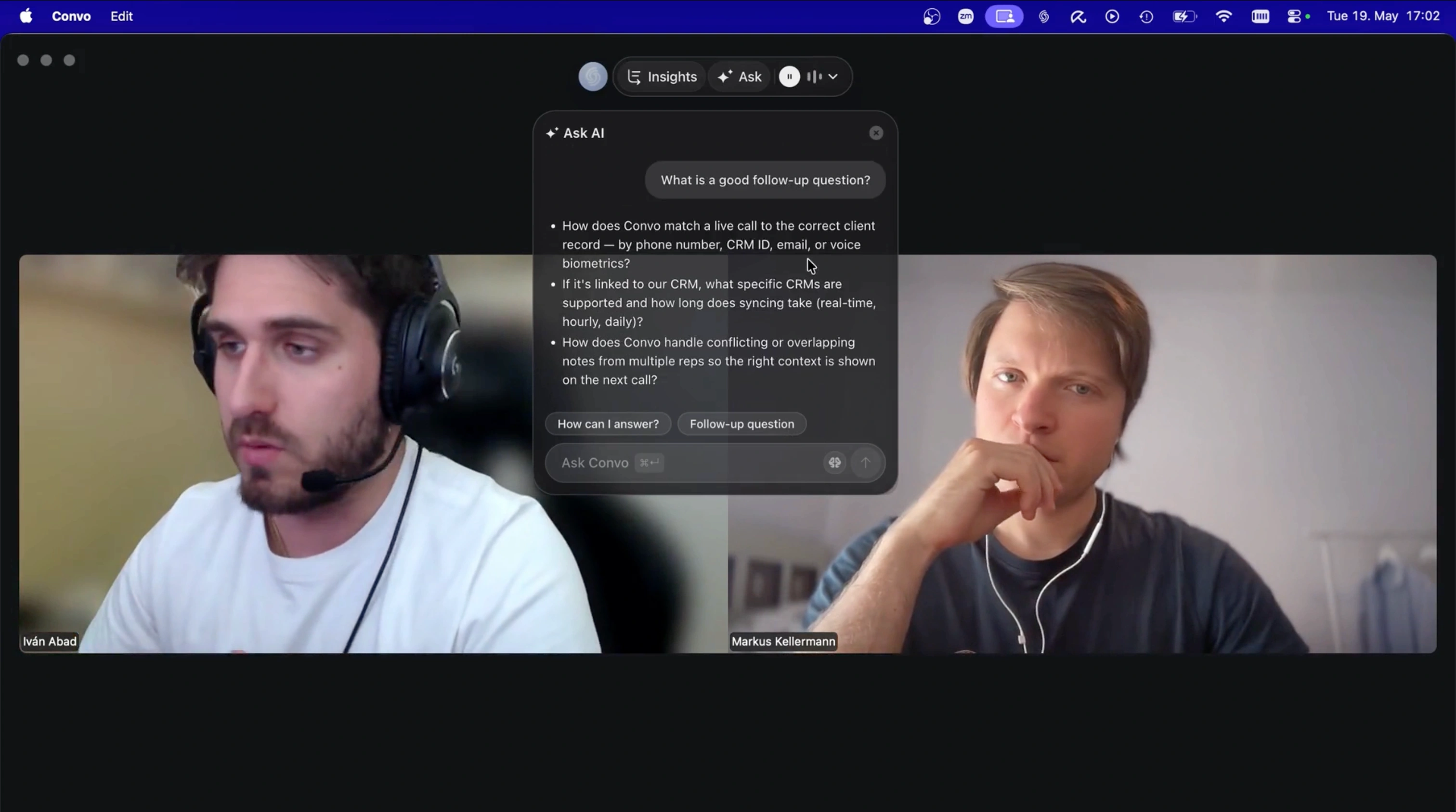
Convo's panel suggests a response mid-call, visible only to you, while Fireflies only hands you a transcript afterward.
Cross-meeting memory. Convo remembers every meeting it's been part of. When a client mentions something from three weeks ago, the relevant context surfaces in the sidebar automatically. When a prospect says "you mentioned a discount last time," I can see the exact sentence I said. Fireflies has a searchable archive, which is useful, but you have to search it after the call. Convo brings the right moment into the live call when it matters.
Document upload. You upload your own files (sales decks, pricing sheets, product specs, competitive briefs) and Convo references them during the meeting. When a prospect asks about pricing, the answer comes straight from your uploaded pricing sheet within a couple of seconds. When a candidate asks about benefits, the answer comes from your HR doc. Fireflies doesn't do this.
Bot-free capture on Mac. Convo captures system audio directly from your Mac, so nothing joins the meeting from the outside. Other participants don't see a "Fireflies Notetaker" entry in the attendee list, and clients don't ask why a recording bot is on the call.
Conversation analytics. The same talk-to-listen ratios, topic tracking, and the conversation intelligence features Fireflies sells on its Business plan at $19/user, included in Convo's Professional tier.
The trade-off is honest. Convo starts at $22.49 per user per month on annual billing where Fireflies Pro is $10, and the premium is what the during-the-call help costs. Skip Convo if all you want is the archive and the Salesforce sync. Fireflies gets you exactly that for less. For sales reps, customer success managers, recruiters, and consultants whose performance on the call drives the outcome, the ROI math is straightforward.
Try Convo free for 7 days
The help arrives while the call is still happening, drawn from your own material and your own past calls. Download Convo →
My Honest Verdict
Fireflies AI is a capable meeting transcription tool with strong CRM integrations. If your primary need is automatic meeting minutes and searchable archives, it does the job well. The transcription quality is solid, the CRM sync is genuinely useful, and the free tier is generous enough to try it properly.
But it's not a complete solution. The visible meeting bots create friction. The cloud processing raises privacy questions. And it only helps after the meeting, when you might have already fumbled the important moments.
My recommendation: If you only need meeting documentation and Salesforce automation across a big rep team, Fireflies is worth the $10/month Pro plan. The architecture fits the job.
For everyone whose calls are the actual product (sales, customer success, recruiting, consulting, founder work), Convo is the better tool. The help shows up during the conversation rather than in the write-up afterwards, and it walks into every call already knowing what happened on the last one. The 7-day free trial is enough time to feel the difference before committing.
Pick the tool that helps you during the call
If your calls are where deals are won, test the difference on your own next one. Try Convo free for 7 days. Side by side breakdown, Convo vs Fireflies.
Frequently Asked Questions
Is Fireflies AI worth it? For meeting transcription and CRM integration, yes, the Pro plan at $10/month delivers good value. But if you need real-time help during calls or have privacy concerns about cloud processing, Convo is where I'd look next.
Is Fireflies AI accurate? Transcription accuracy is 90-95% in good audio conditions. It drops with background noise, multiple speakers talking simultaneously, or heavy accents. Always review transcripts before sharing.
Is Fireflies AI safe? Technically, yes. Fireflies holds SOC 2 Type II, GDPR, and HIPAA certifications with 256-bit AES encryption. However, all audio is uploaded to their cloud servers (GCP/AWS), their privacy policy allows data use for marketing and third-party sharing, and their liability is capped at $100. For industries with strict data requirements (healthcare, legal, finance), the gap between "certified" and "private" may be a compliance concern. A class-action lawsuit filed in December 2025 alleges illegal biometric data collection without consent.
Has Fireflies AI been sued? Yes. In December 2025, a class-action lawsuit (Cruz v. Fireflies.AI Corp.) was filed in Illinois alleging that Fireflies illegally collects biometric voiceprint data without written consent, violating the Illinois Biometric Information Privacy Act (BIPA). The lawsuit represents people who were recorded in meetings without ever agreeing to Fireflies' terms of service. Separately, competitor Otter.ai was sued in August 2025 for similar allegations.
Can Fireflies record me without my consent? If someone else in your meeting has Fireflies enabled, yes, the bot will join and record the entire conversation. While the bot is visible in the participant list, you may not notice it immediately. In the 12 U.S. states that require all-party consent for recording (including California, Florida, and Illinois), this creates a legal gray area. The person who enabled Fireflies may be liable for recording others without explicit consent.
What universities have banned Fireflies AI? Several major institutions have blocked AI meeting bots. Cornell University and Tufts University automatically block Fireflies from Zoom and Teams meetings. The University of Oxford removed automated access for Fireflies, Read.ai, and Sembly AI. The University of Cambridge recommends all members block AI note-taking bots and only permits university-licensed Microsoft Copilot.
Do participants know Fireflies is recording? Yes. A visible "Fireflies Notetaker" bot joins as a meeting participant. All attendees can see it in the participant list. However, in practice, many participants don't notice the bot until after the meeting or may not understand what it does.
Does Fireflies work with Slack? Limited support. Fireflies primarily works with Zoom, Google Meet, and Microsoft Teams. Slack Huddles integration is incomplete.
What's better than Fireflies for privacy? If privacy is your priority, look for bot-free alternatives that capture audio locally on your device rather than sending a bot into the meeting. This eliminates consent issues, prevents enterprise IT blocks, and keeps your audio off third-party servers. Convo takes this approach on macOS. No bot joins your calls, and audio is processed natively on your machine.
What do Reddit users say about Fireflies AI? Mixed, and split the same way as this review. The transcription gets genuine praise (an executive assistant who wrote minutes by hand for years calls it "life changing"), while complaints cluster on support ("it's all AI and I've been waiting for days") and the bot's privacy footprint. A 397-upvote r/privacy thread was written by a candidate who turned down three job interviews rather than be recorded by Fireflies. For keeping the conversation natural, Convo captures audio locally so nothing joins the meeting and nobody changes how they talk.
Markus is the founder of Convo, building an AI meeting assistant that automates everything after the call. Years of experience building AI products. Believes technology should help people in the moment, not just analyze the past.
Ready to transform your meetings?
Join professionals using Convo to feel confident in every conversation.
Get StartedCONTINUE READING