

Markus Kellermann Founder & CEO
Best AI Meeting Assistants for Mac in 2026 (Tested & Ranked)
Markus Kellermann Founder & CEO
We tested 10 AI meeting assistants on a MacBook Pro to find which ones work well on macOS, with an honest ranking and performance notes.
Why Mac Users Need Different Meeting Tools
If you're a Mac user looking for AI meeting assistants, you've probably noticed something frustrating. Most "best AI meeting tools" lists are written for Windows users. They recommend tools that either don't have native Mac apps, run poorly on macOS, or weren't designed with Mac users in mind.
I spent the past two months testing every major AI meeting assistant on my M2 MacBook Pro. I ran them through real client calls on Zoom, Google Meet, and Microsoft Teams. I checked Apple Silicon performance, battery drain, Safari compatibility, and how well they integrate with the Mac ecosystem.
This guide covers what Mac users actually need to know, like which tools have native macOS apps, which work best on Apple Silicon, and which ones you should avoid if you care about a genuine Mac experience.
A quick note before we get into it. Most of these tools are good at capturing what already happened in your meeting. Only a couple do the harder thing, which is actually helping you while the meeting is still happening. Convo is the only one in this list that does both well on Mac, and I'll explain why throughout.
How I Tested These Tools
Every tool on this list went through the same process on the same machine.
Hardware: M2 MacBook Pro, 16GB, macOS Sonoma 14.4
Scenarios: Two real meeting types per tool. One outbound prospect call on Zoom (15-30 minutes), one internal team sync on Google Meet (30-45 minutes). I also ran a fixed Microsoft Teams interview format through each one to see how they handled enterprise calls.
What I scored:
- Apple Silicon performance (CPU and battery drain during a 45-minute call)
- Audio capture quality (system audio vs microphone-only)
- Whether a visible bot joined the meeting
- Transcript accuracy on a known script I read at the start
- Latency of any in-call assistance (only Convo and Cluely have this)
- Quality of post-call summaries and follow-up emails
What I didn't score: marketing claims, NPS scores, review-site averages. I only looked at how each tool actually behaved on my MacBook during a real call.
What Mac Users Should Look For
Before diving into rankings, here's what separates good Mac meeting tools from mediocre ones:
Native macOS App vs. Electron Wrapper vs. Browser-Only
- Native Swift apps feel responsive and integrate with macOS features (menu bar, notifications, Spotlight)
- Electron apps work but often feel sluggish and drain battery faster
- Browser-only tools work but miss keyboard shortcuts and system integration
Apple Silicon Optimization
- M1/M2/M3 native apps are significantly faster and use less battery
- Rosetta 2 apps work but aren't optimized
- Some tools still don't support Apple Silicon at all
Real-Time Help vs. After-the-Fact Notes
- Most tools only document what happened after the call ends
- A small number (Convo, Cluely) help you in the moment with live suggestions
- For sales, customer success, and client work, in-the-moment help is the bigger lever
Bot-Free vs. Bot-Based
- Bot-free tools capture audio directly from your Mac (no one sees anything)
- Bot-based tools join your meeting as a visible participant
- Mac users tend to prefer privacy-focused, bot-free approaches
Local Processing vs. Cloud Processing
- Local processing keeps your data on your Mac
- Cloud processing uploads audio to external servers
- For privacy-conscious Mac users, local is usually preferred
Want the short answer?
Every notes app on this list tells you afterward what you missed. Convo tells you during the meeting, while you can still ask the question you were about to forget. The trial is free for 7 days and setup on a Mac takes about two minutes.
The 10 Best AI Meeting Assistants for Mac [2026]
1. Convo — Best Overall for Mac Users
Desktop App: Yes (Mac, Windows, Linux)
Apple Silicon: Native, optimized
Bot Joins Meeting: No (bot-free, local capture)
Real-Time Help: Yes (8-second analysis loop)
Pricing: $29.99/month (Starter), $69.99/month (Professional), 7-day free trial
Convo is the only tool in this list that does two things at once on Mac. It captures meetings without a bot and it helps you while the conversation is still happening. Most of the other tools do one or the other. Convo does both.
Here's what makes it stand out for Mac users.
Real-time suggestions during the call
While you're on a call, Convo analyses the conversation every eight seconds and shows you suggested responses in a floating panel on your screen. The panel is visible only to you. Other participants see nothing.
Behind the scenes, Convo detects the type of conversation you're in (discovery, objection handling, negotiation, brainstorming, technical Q&A) and adapts its suggestions to that context. If a prospect raises an objection, you get an objection-handling suggestion. If a candidate gives a vague answer, you get a follow-up question. If you forget what was discussed in last week's meeting with the same person, the relevant snippet surfaces inline.
You can also press Cmd+Enter mid-call and type a question. The answer comes from your live transcript, your past meeting history, or your uploaded documents.
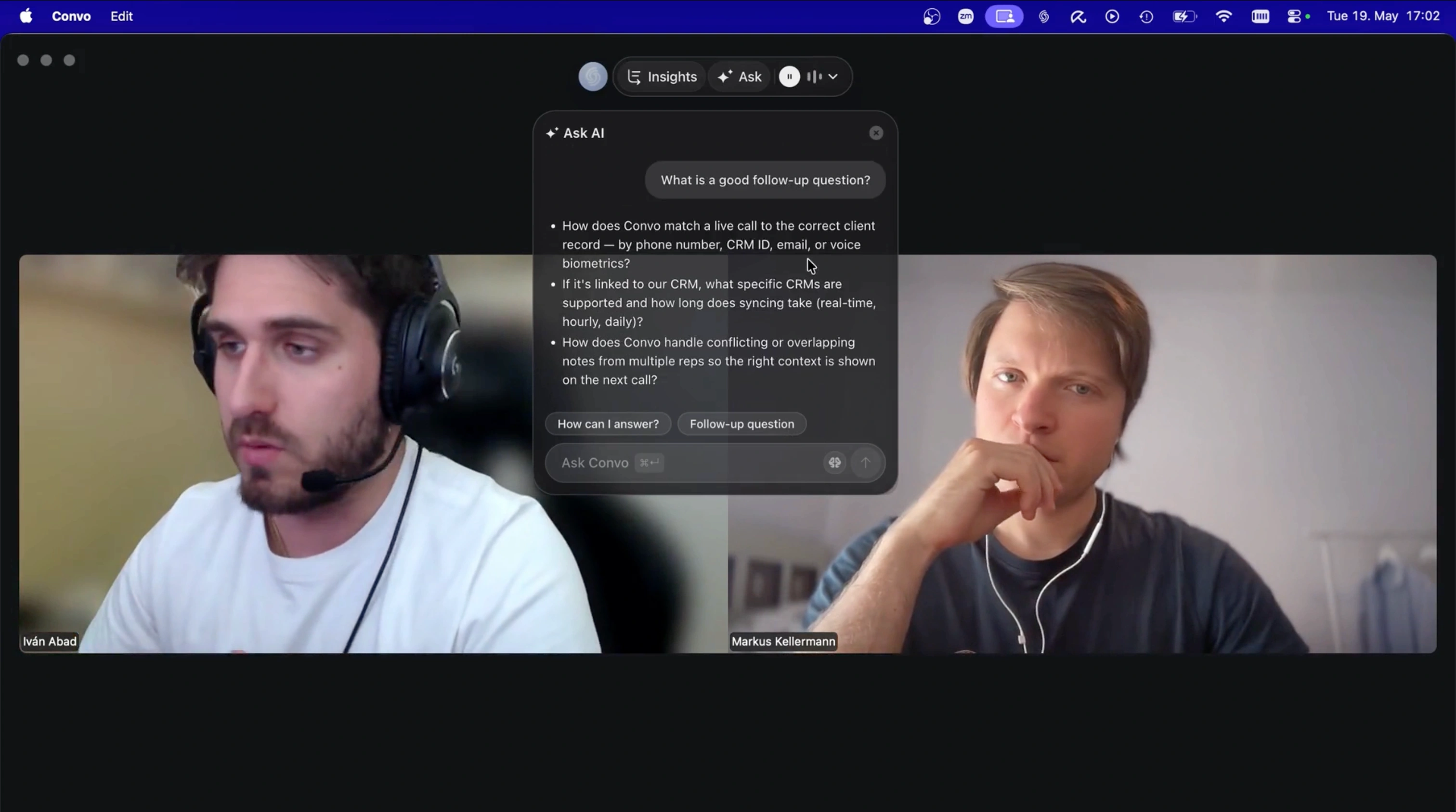
Convo's suggestion panel floats over the call on macOS, visible only to you. Other participants see nothing.
Cross-meeting memory
This is the feature that took the longest for me to appreciate, but it's the one I'd miss most if it disappeared.
Convo remembers every meeting it's been part of. When a client mentions something from three weeks ago, the context shows up automatically in the sidebar. When a prospect says "you mentioned a discount last time," I can see the exact sentence I said. When my CS colleague asks "what did the customer want on Monday?", I type the question and get the answer pulled from the transcript.
Granola, Otter, and Fireflies all keep transcripts in an archive. None of them surface relevant context from past meetings live during a new call. That's the Convo difference.
Document upload (sales decks, pricing sheets, product specs)
You can upload your own files (sales decks, pricing sheets, product specs, competitive briefs, internal FAQs) and Convo references them during calls. When a prospect asks about pricing, the answer comes straight from your uploaded pricing sheet within a couple of seconds. When a candidate asks about benefits, the answer comes from your HR doc.
This is the feature that closes deals. Most of the time, the reason someone says "let me get back to you" is because they don't remember the exact answer in the moment. Convo removes that excuse.
Conversation analytics
After every call, you get a breakdown of who spoke when, your talk-to-listen ratio, the topics that came up, and a clean transcript with speaker labels. Over time, those stats turn into patterns. You see which sales calls had the highest engagement, which CS calls had the most unanswered questions, and which interview formats produced the best hires.
For team leads, Convo rolls this up across the whole team. You see which reps have the right talk-to-listen ratio, where deals stall, and which conversations move them forward. It's coaching based on what actually happened, not on what someone wrote in the CRM afterward.
Bot-free, local capture on Mac
Same model as Granola and Jamie, where nothing joins your meeting. Convo captures system audio directly from your Mac. Other participants never see a bot, never see a notification, never know you're using anything. For client-facing work, this is the difference between a polished call and an awkward "do you mind if I record this?" moment.
Audio processing is local by default for Starter accounts. For Professional accounts, you get faster cloud transcription with a 30-day deletion policy.
Cross-platform plus integrations
Convo runs on macOS, Windows, and Linux. Works with Zoom, Google Meet, Microsoft Teams, Webex, Slack Huddles, and anything else that plays audio on your computer. Integrates with Google Calendar (for meeting detection), Gmail and Apple Mail (for follow-ups), Slack (for sharing summaries), and Attio CRM (for contact sync).
It supports six languages (English, Spanish, French, German, Portuguese, Italian) with automatic language detection.
Why Mac users love it:
- The only tool on this list that combines bot-free Mac capture with real-time in-call help
- The only tool that pulls context from past meetings into the live call
- The only tool that lets you upload documents and references them during the conversation
- Real-time suggestions appear in a Mac-native floating panel, invisible to other participants
- Works with Safari, Zoom, Google Meet, Teams, Webex, and Slack Huddles
- Cross-platform: same experience on Mac, Windows, and Linux
Limitations:
- Premium pricing reflects the real-time AI capabilities (cheaper tools exist if you only want transcripts)
- Best ROI is for people in 5+ meetings per week; a once-a-week meeting habit won't show the full value
Best for: Mac users who want to perform better during meetings, not just document what happened afterward. Sales reps, customer success managers, recruiters, consultants, and founders running prospect calls.
Try Convo free for 7 days
Real-time AI help, cross-meeting memory, bot-free capture. Download Convo for Mac →
2. Granola — Best for Minimalist Mac Users
Native macOS App: Yes
Apple Silicon: Native
Bot Joins Meeting: No
Real-Time Help: No
Pricing: Free Basic plan (limited meeting history), Business $14/user/month
Granola is a beautiful, Mac-native meeting notes app that feels right at home on macOS. It captures audio directly from your Mac and generates AI summaries, but with a unique twist. You can guide the AI by adding your own notes during the meeting. For a deeper look at where Granola falls short for sales and CS teams, see my full Granola review.
The app has a thoughtful design. From the traffic light buttons to calendar-based notifications, everything feels native to Mac.
Why Mac users love it:
- Beautiful Mac-native design that feels like an Apple app
- Bot-free: captures system audio directly
- Works with Zoom, Google Meet, Teams, Slack, and WebEx
- Collaborative AI: you guide the summary with your own notes
- Available on iOS for mobile follow-up
Limitations:
- No real-time help during calls (notes only after the meeting ends)
- No audio/video playback (doesn't record media)
- Limited integrations (no API, no MCP server)
- Not built for enterprise governance or compliance
Convo also captures bot-free on Mac with the same clean, no-bot-on-the-call experience. The difference is what happens during the meeting. Granola is silent until the call ends. Convo gives you live suggestions, pulls context from past meetings, and answers questions you type mid-call. Same capture model, more active help.
Best for: Mac users who want a clean, simple meeting notes app without complexity and don't need help during the call.
3. Jamie — Best for Multi-Language Mac Users
Native macOS App: Yes
Apple Silicon: Native
Bot Joins Meeting: No
Real-Time Help: No
Pricing: Free tier available, paid plans from $24/month
Jamie runs as a native desktop app on Mac and captures system audio directly. It's bot-free, works across any meeting platform, and supports 99+ languages, which makes it excellent for international teams.
Why Mac users love it:
- Native macOS and iOS apps with cross-platform sync
- Bot-free operation across any meeting tool
- Supports 99+ languages with speaker recognition
- Works for in-person meetings too (just record)
- GDPR-compliant with Frankfurt-based servers
Limitations:
- No real-time suggestions during calls
- No cross-meeting memory or context retrieval
- Higher price point than budget transcription tools ($24/mo)
If you're paying $24/month for Jamie, you're already in Convo's price range. Convo adds the layer Jamie skips, with real-time suggestions while you're still talking, cross-meeting memory, and document upload. Both are bot-free on Mac. Convo also covers six languages (English, Spanish, French, German, Portuguese, Italian), which covers most European business teams without overkill.
Best for: Mac users with international teams or multilingual meetings where rare languages matter more than in-call help.
In-call help, not just notes
If you've used Granola or Jamie and wished it actually helped during the call, try Convo free for 7 days. Same bot-free Mac experience, plus real-time suggestions and memory across meetings.
4. Krisp — Best for Noisy Environments
Native macOS App: Yes (requires M1 or later)
Apple Silicon: Native (M1+ required)
Bot Joins Meeting: No
Real-Time Help: No
Pricing: Free tier (60 min/day), Pro $8/month
Krisp started as noise cancellation software and evolved into a full AI meeting assistant. The Mac app requires Apple Silicon (M1 or later) and creates virtual audio devices for both microphone and speaker noise cancellation.
Why Mac users love it:
- Excellent noise cancellation (best in class)
- Native Apple Silicon app
- Bot-free meeting transcription
- Creates virtual Krisp Microphone/Speaker devices
- Free tier includes 60 minutes/day of noise cancellation
Limitations:
- Requires M1 Mac or later (no Intel support)
- Limited meeting notes on free tier (2/day)
- Focused more on noise cancellation than AI features
- No real-time call suggestions or context from past meetings
Krisp solves the input problem (your voice should sound clear). Convo solves the output problem (you should know what to say). The two are complementary, not competitive. Plenty of Convo users keep Krisp running for noise cancellation and use Convo for the AI layer on top.
Best for: Mac users in noisy environments (coffee shops, co-working spaces, home offices).
5. Radiant (by Supernormal) — Best Free Mac Option
Native macOS App: Yes (M1 or later only)
Apple Silicon: Native (M1+ required)
Bot Joins Meeting: No
Real-Time Help: No
Pricing: Free (open beta)
Radiant is a new Mac-only app from Supernormal that's completely free during its open beta. It captures all your meetings, generates notes and summaries, then suggests next steps and can even execute them in your favorite work tools.
Why Mac users love it:
- Completely free during beta
- Mac-native with beautiful design
- Bot-free with fast local processing
- Can execute suggested actions in Gmail, Slack, Linear, Cursor
- SOC 2 certified with GDPR compliance
Limitations:
- Mac-only with M1 requirement (no Intel, no Windows, no Linux)
- English only (for now)
- Still in beta, features may change
- No real-time call help, no cross-meeting memory
If you're on a tight budget and Mac-only, Radiant is a fair starting point. The two reasons people move to Convo once they have budget. They need in-call help (Radiant doesn't have it) and they need cross-meeting memory (Radiant doesn't have it). Convo also runs on Mac, Windows, and Linux, which matters as soon as you bring in a teammate on a different OS.
Best for: Mac-only users who want a free, post-call notes app and don't need live coaching.
6. Fireflies.ai — Best for Sales Teams on Mac
Native macOS App: Yes (launched November 2025)
Apple Silicon: Native (M1+ required)
Bot Joins Meeting: Yes (bot-free coming soon)
Real-Time Help: No
Pricing: Free tier, Pro $10/user/month
Fireflies recently launched a native Mac desktop app with Apple Silicon support. It's primarily known for CRM integrations and conversation analytics, which makes it popular with sales teams. For the broader sales recording category, see our sales call recording software guide.
Why Mac users love it:
- Native Mac app (macOS 12.0+, M1 required)
- Deep CRM integrations (Salesforce, HubSpot, Pipedrive)
- Conversation intelligence (talk time, sentiment, topic tracking)
- Free tier with 400 min of transcription and storage
- Bot-free recording coming soon
Limitations:
- Currently uses meeting bots (bot-free is "coming soon," and has been for a while)
- Primarily cloud-processed
- Can feel overwhelming with features
- No real-time call assistance
The biggest pain point Mac users mention about Fireflies is the bot joining the call. Prospects notice. Clients ask about it. Convo is bot-free today, not "coming soon," and it adds the layer Fireflies skips entirely, live in-call help. If your CRM is HubSpot or Pipedrive, Convo syncs via integrations and matches Fireflies on that front. If you need Salesforce-deep automation across hundreds of reps, Fireflies still has the edge.
Best for: Mac-using sales teams on Salesforce who need automatic CRM updates and don't mind a visible bot.
→ See detailed Convo vs Fireflies comparison for Mac
Bot-free today, not "coming soon"
If the visible bot in Fireflies bothers you (or your prospects), switch to Convo. Bot-free on Mac since day one, plus real-time help during the call. 7-day free trial.
7. Otter.ai — Best for Teams Needing Archives
Native macOS App: Yes (launched October 2025)
Apple Silicon: Native
Bot Joins Meeting: Optional (can record without bot)
Real-Time Help: No
Pricing: Free tier, paid from $16.99/month
Otter's new macOS desktop app lets you record without their Notetaker bot joining, a major upgrade for Mac users who found the bot intrusive.
Why Mac users love it:
- Native Mac app with Apple Silicon and Intel support
- Can record without bot (system audio capture)
- Works with headphones during meetings
- Excellent searchable meeting archive
- Slack Huddle auto-detection
Limitations:
- Bot-free mode relatively new
- Higher price point than competitors
- Heavy cloud processing (audio uploaded to Otter's servers)
- No real-time call suggestions
- BIPA biometric lawsuit settled in 2024 raised questions about voiceprint storage
Otter and Convo actually overlap on the post-call summary side. Where they diverge, Convo captures audio locally on your Mac and adds the real-time layer Otter doesn't have. If you've been a long-time Otter user mainly for the archive, the move to Convo gives you everything Otter gives you plus the in-call help. Transcripts export cleanly and the archive is searchable, so you don't lose anything.
Best for: Mac users who need searchable meeting archives across their organization and don't care about in-call coaching.
→ See detailed Convo vs Otter comparison for Mac
8. Read AI — Best for Cross-Platform Teams
Native macOS App: Yes
Apple Silicon: Native
Bot Joins Meeting: Optional
Real-Time Help: No
Pricing: Contact for pricing
Read AI offers a Mac desktop app that can capture and transcribe without bots. It works across meetings, emails, and messages with SOC II certification.
Why Mac users love it:
- Native Mac desktop app
- Bot-free capture option
- Works across 20+ languages
- Selected as Zoom Essential App
- Integrates with many work tools
Limitations:
- Pricing not transparent (you have to talk to sales)
- Primarily enterprise-focused
- No real-time in-call suggestions
- Heavier onboarding compared to Convo or Granola
Read AI's sweet spot is large companies that want analytics across meetings, emails, and Slack. Convo is better for individuals and teams that need a fast install, transparent pricing, and active in-call coaching. If your finance team won't approve "contact for pricing," Convo's $29.99 Starter is on your card today.
Best for: Mac users in enterprises that need cross-platform meeting intelligence and have procurement bandwidth.
9. Fathom — Best Free Option (But Has Bots)
Native macOS App: Yes (via desktop drawer)
Apple Silicon: Native
Bot Joins Meeting: Yes
Real-Time Help: No
Pricing: Free for individuals
Fathom offers free unlimited recording and transcription for individuals. The Mac app provides quick access via a desktop drawer, though it uses bots for recording.
Why Mac users love it:
- Completely free for individuals
- Fast summaries (often ready before meeting ends)
- SOC 2 and HIPAA compliant
- Works with Zoom, Meet, and Teams
Limitations:
- Visible bot joins your meetings
- Limited Microsoft Teams compatibility
- No real-time assistance
- No cross-meeting memory or document upload
Free is free, and Fathom is the right call if your only goal is post-call transcripts. The two reasons people switch from Fathom to Convo. They don't want a bot in client calls, and they want active help during the call. The Convo trial is seven days, which is enough to feel the difference before committing.
Best for: Budget-conscious Mac users who don't mind visible meeting bots and only need post-call notes.
10. Cluely — Real-Time AI Coaching
Native macOS App: Yes (macOS 12+)
Apple Silicon: Native
Bot Joins Meeting: No
Real-Time Help: Yes
Pricing: Free tier, Pro $19.99/month
Cluely is a real-time AI assistant that provides live coaching during video calls. It displays a floating panel with AI suggestions positioned outside your shared screen area, so it's invisible to other participants. Popular for sales calls and client meetings where real-time support helps.
Why Mac users love it:
- Native Mac app with real-time AI help
- Bot-free and invisible to other participants
- Works with Zoom, Google Meet, Teams, and more
- Transcribes and generates notes with action items
- Can draft follow-up emails and reports
Limitations:
- Marketing leans into "cheating" angle, which some find off-putting
- Some companies prohibit its use in job interviews or assessments
- Pro tier ($19.99/mo) required for advanced AI models
- No pre-meeting context from past conversations
- No document upload (you can't ask Cluely about your own sales deck)
Cluely is the closest direct competitor on real-time help. The two differences that matter for Mac users. Convo pulls context from past meetings with the same person (Cluely doesn't, every call starts cold), and Convo lets you upload your own documents and references them mid-call (Cluely doesn't). Cluely is also positioned around interviews and exams, which has gotten a chillier reception in B2B sales contexts. Convo is positioned around real client work. If Cluely's posture is the dealbreaker for you, the full field of Cluely alternatives for sales calls is worth a read.
Best for: Mac users who want real-time help for sales calls, client meetings, or presentations. Check your company's policies before using in interviews or assessments.
Real-time help plus memory of past calls
Convo does live coaching like Cluely, plus it remembers what was said in your past meetings so context surfaces automatically. Try Convo free for 7 days.
Comparison Table: Mac AI Meeting Assistants
| Tool | Native Mac App | Apple Silicon | Bot-Free | Real-Time Help | Cross-Meeting Memory | Document Upload | Starting Price | Best For |
|---|---|---|---|---|---|---|---|---|
| Convo | ✅ | ✅ | ✅ | ✅ | ✅ | ✅ | $29.99/mo | Real-time help + memory |
| Granola | ✅ | ✅ | ✅ | ❌ | ❌ | ❌ | $14/mo | Minimalist notes |
| Jamie | ✅ | ✅ | ✅ | ❌ | ❌ | ❌ | $24/mo | Multi-language |
| Krisp | ✅ | ✅ M1+ | ✅ | ❌ | ❌ | ❌ | $8/mo | Noise cancellation |
| Radiant | ✅ | ✅ M1+ | ✅ | ❌ | ❌ | ❌ | Free beta | Mac-only budget |
| Fireflies | ✅ | ✅ M1+ | ⏳ Coming | ❌ | ❌ | ❌ | $10/mo | Salesforce teams |
| Otter | ✅ | ✅ | ✅ | ❌ | ❌ | ❌ | $16.99/mo | Team archives |
| Read AI | ✅ | ✅ | ✅ | ❌ | ❌ | ❌ | Contact | Enterprise |
| Fathom | ✅ | ✅ | ❌ Bot | ❌ | ❌ | ❌ | Free | Budget + bot OK |
| Cluely | ✅ | ✅ | ✅ | ✅ | ❌ | ❌ | $19.99/mo | Real-time help only |
What I Actually Recommend
After testing all these tools, here's my honest take for different Mac users.
If you want real-time help during meetings: Use Convo. It's the only tool that helps you during the call with live suggestions, pulls context from past meetings, and references your own documents. Cluely covers real-time but skips memory and documents.
If you want beautiful, simple meeting notes: Use Granola. It's the most Mac-like app on this list and the design is genuinely thoughtful. If you find yourself wishing it also helped during the call, that's when to move to Convo.
If you're on a tight budget: Use Radiant (free beta) or Fathom (free for individuals). Radiant is Mac-native and bot-free. Fathom has bots but is completely free. Both skip the in-call help that Convo provides.
If you're in sales and need CRM integration: Use Fireflies for Salesforce-deep teams. Use Convo for everyone else, especially if you don't want a bot in prospect calls. Convo integrates natively with Attio, Salesforce, HubSpot, and Pipedrive, and pushes call summaries to your CRM automatically.
If you have noisy environments: Use Krisp. The noise cancellation alone is worth it. Run Convo on top for the AI layer; many users do this.
If you need multi-language support: Use Jamie for 99+ languages. Use Convo for the six biggest European business languages (English, Spanish, French, German, Portuguese, Italian) with real-time help on top.
Start with the one that does the most
Convo combines bot-free Mac capture, real-time in-call help, cross-meeting memory, and document upload. Try free for 7 days, no commitment.
The Mac User's Bottom Line
Most AI meeting assistants were built for Windows first, then ported to Mac as an afterthought. That's why so many feel sluggish, drain battery, or lack basic macOS integration.
The tools at the top of this list (Convo, Granola, Jamie, Krisp, and Radiant) were either built for Mac first or have genuinely native Mac apps. They feel right on macOS, integrate with system features, and respect the Mac user experience.
My top recommendation is to start with Convo if you want real-time help during meetings. It's the only tool I tested that combines bot-free Mac capture, live in-call suggestions, cross-meeting memory, and document upload in one app. If you only need clean meeting notes after the call, Granola is a close second with its beautiful design. For everyone else, the trade-offs in the table above should point you to the right pick.
Whatever you choose, make sure it has a native Mac app. Browser-based tools and Electron wrappers just don't cut it for Mac users who care about their experience. Not tied to a Mac? The best AI note-taking apps roundup ranks the field across every platform.
Try Convo free for 7 days
Real-time AI help, cross-meeting memory, bot-free capture, document upload. The only Mac app that does all four. Download Convo →
Frequently Asked Questions
What is the best AI meeting assistant for Mac? Convo is the best overall for Mac users who want real-time help. It's built specifically for macOS with Apple Silicon optimization and is the only tool tested that combines bot-free capture, live in-call suggestions, cross-meeting memory, and document upload. For simple post-call meeting notes only, Granola offers a clean Mac-native experience.
Do AI meeting assistants work with Apple Silicon Macs? Most modern tools do. Convo, Granola, Jamie, Krisp, and Radiant all have Apple Silicon-optimized apps. Some tools like Krisp and Radiant require M1 or later. Convo runs on both Apple Silicon and Intel Macs with native optimization.
Can I use AI meeting assistants without bots joining? Yes. Convo, Granola, Jamie, Krisp, Radiant, and Otter all offer bot-free recording that captures audio directly from your Mac. Other participants won't know you're using them. Fireflies has bot-free "coming soon" but currently still uses a visible bot.
What's the best free AI meeting assistant for Mac? Radiant (by Supernormal) is completely free during its beta and has a native Mac app. Fathom is also free for individuals but uses meeting bots. Both skip the real-time in-call help that paid tools like Convo and Cluely provide.
Which Mac meeting assistant has real-time AI help? Only two tools in this list offer real-time in-call AI coaching, Convo and Cluely. Convo adds two extra layers Cluely doesn't have, cross-meeting memory (context from past meetings surfaces during the live call) and document upload (you can upload your sales deck or pricing sheet and Convo references it during the call).
Do these tools work with Safari? Native Mac apps like Convo capture system audio, so they work with any browser including Safari. Browser-based tools like tl;dv require Chrome extensions.
Which AI meeting assistant has the best transcription on Mac? Most tools achieve 90-95% accuracy in good conditions. Otter.ai and Fireflies are known for particularly strong transcription quality. Convo uses high-accuracy transcription with speaker diarization and supports six languages out of the box.
How much does Convo cost on Mac? Convo's Starter plan is $29.99/month ($22.49/month billed annually) and includes real-time suggestions, summaries, and basic meeting memory. Professional is $69.99/month ($52.49/month billed annually) and adds enhanced real-time suggestions, full cross-meeting memory, document upload, and conversation analytics. There's a 7-day free trial. See Convo pricing for the full breakdown.
Is there an AI notetaker that works natively on macOS? Yes. Convo installs as a Mac desktop app and captures system audio locally on your device, so nothing joins the call and it works with any meeting platform in Safari or Chrome. Granola and Jamie work the same way. The real difference shows up during the call: Convo reads the conversation and helps in real time, while the others only hand you the notes after it ends.
What is the difference between a desktop meeting app and a browser extension on Mac? A desktop app installs on your Mac and captures system audio from any meeting platform, so nothing joins the call and it works across Zoom, Meet, and Teams. Convo, Granola, and Jamie take this route. A browser extension like tl;dv runs inside Chrome and is limited to what the browser exposes. If you want capture that works everywhere without a bot in the meeting, look for the installed desktop app rather than the extension.
My tl;dv review covers its current desktop recording options and limitations.
Markus is the founder of Convo, building an AI meeting assistant that automates everything after the call. Years of experience building AI products. Believes technology should help people in the moment, not just analyze the past.
Ready to transform your meetings?
Join professionals using Convo to feel confident in every conversation.
Get StartedCONTINUE READING