

Markus Kellermann Founder & CEO
AI Sales Call Assistants for Individual Reps
Markus Kellermann Founder & CEO
I tested Convo, Hedy, Cluely and Fireflies. Compare what one seat costs and which plans include useful live help for your sales calls.
TL;DR for Individual Reps
- All four tools I tested offer live help you can buy for one person. Monthly options range from $12.99 to $29.99 before upgrades or extra usage.
- Convo is built for sales reps and teams. Hedy and Cluely support a wider range of conversations, while Fireflies offers Sales Assist within its meeting platform. All four can help during a call.
- The plan determines how much help you get. Convo Starter includes on-demand Ask AI. Professional adds proactive assistance and live qualification playbooks. Fireflies Sales Assist requires a meeting bot, and Cluely charges separately for screen-share hiding.
- Try the assistant while you run a demo. Use an objection you hear in your own calls and see whether the suggested response helps. You should be able to use it while continuing to listen to the buyer.
Why I Would Choose a Tool Built for Sales
We build Convo to help sales reps understand the buyer and know what to ask next. A question about implementation might come from a bad experience with another product. Convo helps you explore that concern before explaining your solution.
I’m Convo’s founder, and I’ve tested all four tools in this guide. I care about how the help feels on the call. You might be sharing your screen when the buyer raises a concern. You should be able to read a useful suggestion and keep listening. Getting help and dismissing it should take as little attention as possible.
If I were buying my own seat, I’d look for help with the parts of a call that are easy to miss. That could mean finding out who else needs to approve the purchase or agreeing on what the buyer needs to see next.
Hedy, Cluely and Fireflies also offer live help across a wider range of meetings. This guide compares what each tool offers someone buying their own seat. Our AI sales assistant comparison also covers prospecting and outbound tools.
Get help with your next sales call.
Convo Starter includes Ask AI for help when you need it during a sales call. Ask for a response to an objection or a follow-up question based on what the buyer has said. See all pricing plans.
What One Seat Costs
I’ve tested each of the four tools below. For prices and plan limits, I checked the vendors’ documentation on 24–25 September 2026. The table uses USD and monthly billing throughout.
| Tool | Main product focus | Monthly cost for one person | What you can use live |
|---|---|---|---|
| Convo Starter | Sales reps and teams | $29.99 | Ask AI using the current conversation. Professional adds proactive help and qualification playbooks. |
| Hedy Pro | Conversation coaching across professions | $12.99 | Sales-mode coaching and Quick Prompts. Automatic suggestions cover the first 120 minutes of each session. |
| Cluely Pro | Meeting assistance and notes | $19.99 | Answers using the call and screen. Screen-share hiding requires a higher plan. |
| Fireflies Pro with recurring AI credits | Meeting capture and analysis | $23 including 50 AI credits | Sales Assist answers from your knowledge base. It requires the bot and consumes credits. |
How Convo Helps During a Sales Call
Suppose a buyer tells you they tried a similar product last year and the team barely used it.
I’d want to understand why before talking about our own product. Perhaps the previous tool created extra work or the person who bought it left the company. Those situations need different responses. Asking what made it difficult for the team to keep using the tool gives the buyer room to explain.
Convo uses the conversation to suggest a response or follow-up question. You can use that help to explore the concern before choosing which part of your offer to explain. The point is to learn enough about this buyer to give them a relevant answer.
Start With Ask AI
Starter is a practical first purchase if you want help when you ask for it. You might need a follow-up after the buyer raises a concern or a reminder of what they said earlier. Ask AI uses the live conversation, so you don’t have to type out the exchange again.
Press ⌘Enter on Mac or Ctrl+Enter on Windows to request help. You can also use the toolbar’s “How can I answer?” and “Follow-up question” prompts. Responses can appear on screen in under two seconds. Once you’ve read the suggestion, ⌘R or Ctrl+R closes the panel so you can return to the buyer.
I would learn the controls in the first-call walkthrough before a customer demo so they’re familiar by the time I need an answer. You can change the shortcuts in Settings to suit how you work.
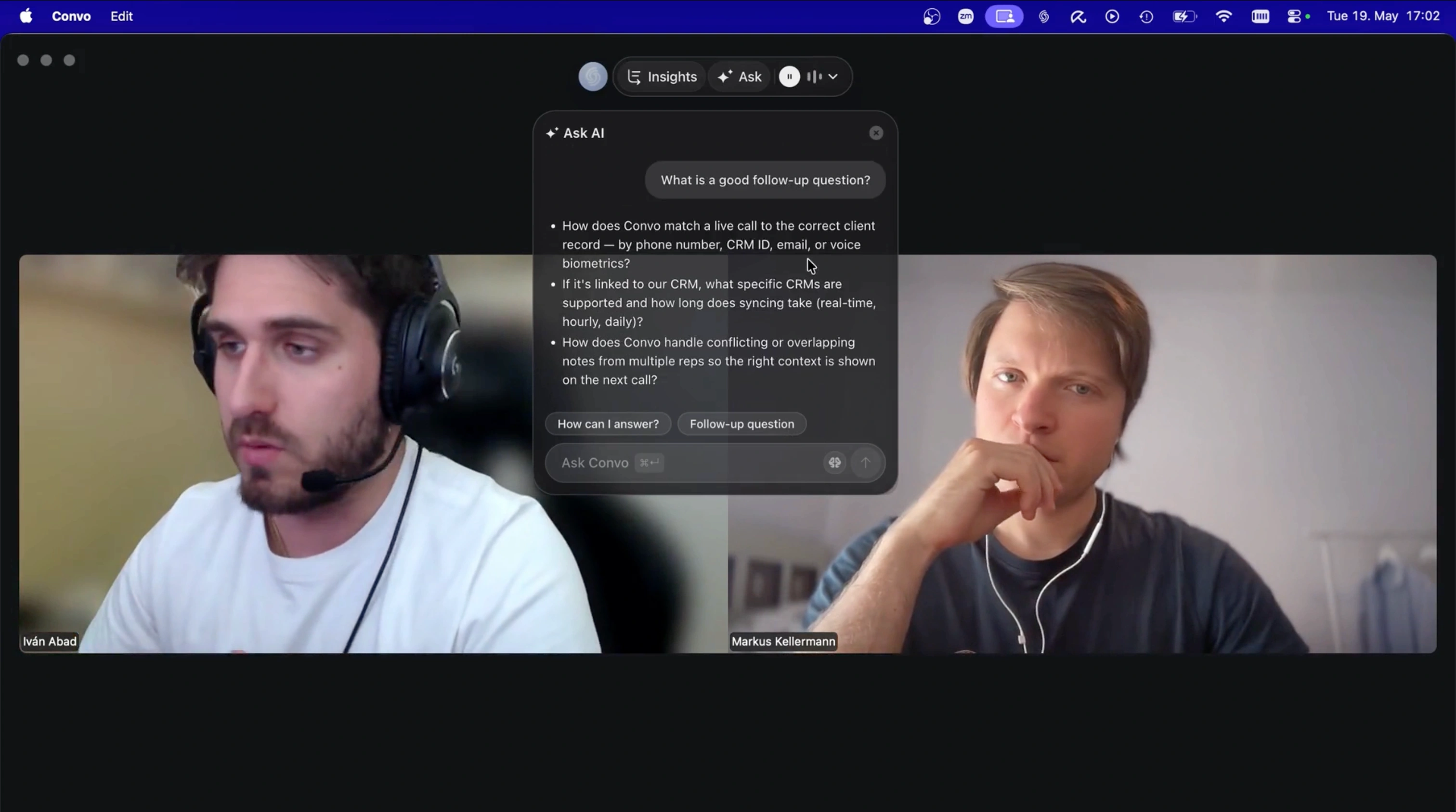
Ask AI suggests a follow-up using the conversation happening on the call.
Starter costs $29.99 monthly or $22.49 per month billed annually. You can buy one seat and use it on your own calls. The useful first test is whether its responses help you handle the moments when you’d otherwise be unsure what to say.
Add Proactive Help When You Need It
The same buyer might mention that their operations director would need to be comfortable with another purchase. You now have someone else to involve in the decision and a reason to ask what they need to see before agreeing to a new rollout.
Convo’s Live Assistant watches for buying signals and objections like these and can suggest a response without waiting for you to ask. It helps you notice what needs exploring while you’re concentrating on answering the buyer.
Your qualification playbook fills in as the buyer answers. It keeps the missing questions visible so you can return to them after handling an objection. You can customise BANT, SPICED or MEDDPICC or write your own questions. By the end of the call you can see what still needs to be established before proposing the next step.
This support is part of Professional at $69.99 monthly or $52.49 per month billed annually. The plan also lets you connect company knowledge so Convo can use your product and pricing material in its answers. It supports up to ten knowledge sources. AI assistance can pause if you exhaust the usage allowance, which is worth checking if you spend most of the day on calls.
Professional makes sense when you want help noticing what you might miss and keeping discovery on track. Starter is enough to begin with answers you request yourself. Choose the plan that matches the help you want on your calls.
Hedy for Live Conversation Coaching
Hedy Pro costs $12.99 monthly or $99.99 annually. Its Sales Meeting mode covers discovery and objection handling with reminders about buying signals and next steps. You can give it context about your offer and group an account’s calls in a Topic.
In the example of the failed rollout, Hedy’s sales prompts let you ask for help exploring the buyer’s concern. On desktop the Quick Prompts sit below the chat input. You can tap one or ask a question yourself. Try that while presenting and compare it with requesting help through Convo’s keyboard shortcut.
Hedy’s automatic suggestions provide periodic coaching during the first 120 minutes of a Pro session. Their frequency is separate from how quickly Hedy answers a prompt you choose.
Hedy is worth considering if you want coaching across other conversations as well as sales. Its mobile apps also support in-person meetings. For my sales calls I favour Convo’s focus on qualification and the way its live playbook works alongside objection support. That fuller workflow requires Professional, while Starter provides the on-demand help described above.
Cluely for Help With the Call and Your Screen
Cluely Pro costs $19.99 monthly. Its meeting assistant uses the conversation and what’s on screen to suggest answers and follow-up questions. Document upload wasn’t available when I tested Cluely. Its pricing page still lists file uploads, so check the app before buying it for answers from your sales documents.
Cluely supports customisable keyboard controls and uses ⌘Enter or Ctrl+Enter to request help. As with Convo, you can get assistance without typing a full question. Give both tools the same sales context and compare the responses you can use while listening.
For the buyer worried about adoption, I’d look for a follow-up that helps establish why the previous rollout failed. That is the conversation you need to have before showing more features. It gives you a useful way to evaluate Cluely’s broader meeting assistance for a sales call.
Screen sharing needs a separate plan check. Cluely Pro + Undetectability costs $149.99 monthly and includes screen-share hiding. Standard Pro does not include it, according to the plan comparison. Convo’s overlay is hidden from screen sharing by default. Check how the assistant appears in your presentation setup before using it with a customer.
Our Cluely alternatives guide covers the wider choice if you’re comparing these products in more detail.
Fireflies if You Already Use It for Meetings
Fireflies’ Sales Assist answers questions from your knowledge base and suggests follow-ups during a call. It’s worth trying if Fireflies already handles your meetings and you want to add live help.
After exploring the adoption concern, you may need a precise answer about onboarding or training. Add the relevant documents and check whether Sales Assist finds the information you need. You can use the same material to evaluate Convo Professional’s knowledge-powered answers.
The desktop Live Assist panel floats over your applications. Sales Assist still requires the Fireflies bot even though some other Live Assist functions work with desktop audio capture. A customer who cannot admit the bot would prevent you from using Sales Assist on that call.
The starting recurring cost is $23 monthly for the $18 Pro plan and a $5 pack of 50 AI credits. Annual billing brings the combined price to $14 per month. Each request consumes credits according to its complexity. Check your credit settings because automatic upgrades can increase the bill and unused purchased credits expire at the end of the billing cycle.
Try It on the Kind of Call You Run
Start with a colleague and a practice call. Give the assistant the context you’d use for a customer meeting and run your normal demo. Use only material you’re allowed to upload.
The example in this guide gives you three moments to work through.
| What the buyer says | What useful assistance should help you do |
|---|---|
| “We tried something similar. The team barely used it.” | Find out what prevented adoption before promising a solution. |
| “The operations director would have to be comfortable with it.” | Establish their concerns and role in the decision. |
| “Send me something and I’ll pass it on.” | Agree what they need to evaluate and whether a meeting with the director would help. |
Then use your preferred tool on a few approved customer calls. Look back at the questions you asked and the next steps you agreed. Check any product answers against your documents and review how much of the allowance you used. You’ll have a better basis for deciding whether to keep the subscription.
What You Need Before Using It at Work
Buying the subscription yourself doesn’t settle whether you can use it with customers. Your employer may need to approve the app and the processing of call audio. Uploading company documents may need approval too. Follow your company’s process for telling participants about recording or transcription.
Convo needs microphone and system-audio access. On macOS that can include Screen Recording permission. The setup guide explains what to allow. Convo uses cloud services for transcription and AI even though no bot joins the meeting.
You can start without a CRM connection. If you choose Professional, prepare a short sales playbook and add current product information before the first call. That gives you something relevant to evaluate without turning setup into a project of its own.
What I’d Choose After Testing All Four
After testing all four, I think Convo is simply better built for sales calls. Starter gives you on-demand help with objections and follow-up questions for $29.99 monthly. You can buy one seat without a team subscription.
Choose Professional if you want help keeping discovery on track. The Live Assistant picks up buying signals and objections while your playbook keeps unanswered qualification questions visible. It also adds company knowledge for answers about your offer.
In the example above, the rep needs to understand why the last rollout failed and involve the right person in the next decision. That’s a useful result to judge the assistant by when you’re deciding whether to keep paying.
Frequently Asked Questions
Can I buy Convo for myself without buying seats for my team? Yes. You can buy one Starter seat for $29.99 monthly or $22.49 per month billed annually. It includes on-demand Ask AI during calls. Your employer may still need to approve its use at work.
Do I need Convo Professional to get help during a call? Starter provides help when you request it. Professional adds proactive assistance and live qualification playbooks along with answers from company knowledge. It costs $69.99 monthly or $52.49 per month billed annually.
How should I compare Convo with Hedy or Cluely? Give each tool the same sales context and ask for help with the same objection. Check whether its response helps you continue the conversation while listening to the buyer. Include Convo Professional’s Live Assistant and playbook if you want to evaluate proactive discovery support.
Can I try these tools without an annual subscription? All four have monthly paid options. Hedy Free includes five hours per month with automatic suggestions during the first 30 minutes of each session. Cluely Free offers limited responses. Fireflies Free includes a one-time allocation of AI credits. These allowances let you try the interaction before deciding what you need for regular calls.
What about WingRep for an individual rep? WingRep lists Starter at $50 per seat per month. The $75 Pro plan adds custom sales frameworks and its Specialist for product-knowledge answers. That plan directs buyers to sales. Confirm that you can buy one seat and check the contract term before including it in your budget.
Markus is the founder of Convo, building an AI meeting assistant that automates everything after the call. Years of experience building AI products. Believes technology should help people in the moment, not just analyze the past.
Ready to transform your meetings?
Join professionals using Convo to feel confident in every conversation.
Get StartedCONTINUE READING