

Markus Kellermann Founder & CEO
tl;dv Review 2026 (Pricing, Free Plan and My Experience)
Markus Kellermann Founder & CEO
My experience with tl;dv for sales calls, including its limited desktop app, recording options, free-plan restrictions and coaching feedback.
TL;DR
- tl;dv felt like a classic meeting recorder to me. Its recordings, clips and meeting library are useful for reviewing customer conversations but there is no live support during the conversation.
- I found the desktop app confusing because it only let me start recordings, with no dashboard or broader meeting workspace. Audio recording works without a bot but video requires one to join.
- The free plan includes full automatic AI notes for your first ten meetings with no monthly reset. After that, notes cover only the first ten minutes of each meeting. Free recordings are retained for three months.
- I wouldn't choose tl;dv for help during a sales call. In my experience, there was very little I could use while speaking with the customer, even though that was where I needed the most support.
My Experience With tl;dv
The first thing I found confusing about tl;dv was the desktop app. After installing it, I expected a dashboard where I could open previous meetings and work with them. Instead, I could start an audio or video recording, but had to go to the browser for the rest of the product. I didn't understand why the app offered so little beyond recording.
That also describes my broader experience. tl;dv felt like a classic meeting recorder with analysis added around the recordings. There is value in keeping a record of a customer conversation, especially when you need to share it with someone who wasn't there. For sales calls, though, I expected more useful feedback about how I could improve, and I missed having help during the conversation itself.
As Convo’s founder, I have a particular interest in this. When a buyer hesitates, I want to understand what is behind it before I spend another five minutes explaining the product. A tool that helps me ask a better question at that moment is useful to me, so I looked at tl;dv with that expectation in mind.
Get help with your next sales call.
Convo suggests a response or follow-up based on the conversation, so you can explore a buyer’s concern before moving on. See how Convo works.
Where tl;dv Is Useful
I can see tl;dv being useful for a sales manager who needs to review conversations they couldn't attend. A recording lets them hear how a rep handled an objection, and a short clip makes it easier to discuss that exchange together without asking everyone to watch the full call.
The same applies when someone else takes over an account. Hearing what the customer actually said can help them understand a concern that a short written handover misses. If that is the problem you are trying to solve, a shared meeting library has a clear purpose.
tl;dv also brings together information from different meetings and connects with your CRM. I can see that being useful when several people are working on the same account. For my own calls, I would have liked a little more guidance on what I could improve.
The Desktop App Felt Too Limited
For me, installing a desktop app should make it easier to work from one place. With tl;dv, I still needed the browser to access the broader meeting workspace, while the app itself was there to capture audio or video. I kept wondering why I couldn't do more in the application I had just installed.
This may suit you if you already work in the browser and only need the desktop app to handle recording. I found the separation confusing, and it is something I would check during a trial. Open a previous meeting, look for its notes and see where you have to go to prepare for the next call. That gives you a better idea of the daily workflow than knowing that a desktop version exists.
My expectation also goes beyond having a dashboard. During a sales conversation, I want something useful available in the app, such as help with a question I am unsure how to approach. Recording the call didn't address that need for me.
In Convo, I can request help with a response or follow-up while the call is running. On Professional, I can also see which qualification questions remain unanswered and return to them before we finish. That gives me a reason to keep the app open during the conversation.
Bot-Free Audio, but a Bot for Video
I liked being able to record audio without another participant joining the meeting. It was annoying to find that video recording still required a bot, particularly because these are two recording options within the same product.
tl;dv’s bot-free recording captures microphone and system audio, without video or screen sharing. For the video workflow I used, the bot had to join the call.
Whether this matters depends on what you need to keep. Audio may be enough when you want to revisit a discussion. If a customer is showing you their current process on screen, or you need to review a product demo, losing the visual context is more limiting. In those cases, you need to be comfortable having the recording bot in the meeting.
I would decide this before comparing plans. A bot-free audio recorder won't cover the same use case as a recording that includes what the customer showed you.
What the Free Plan Actually Gives You
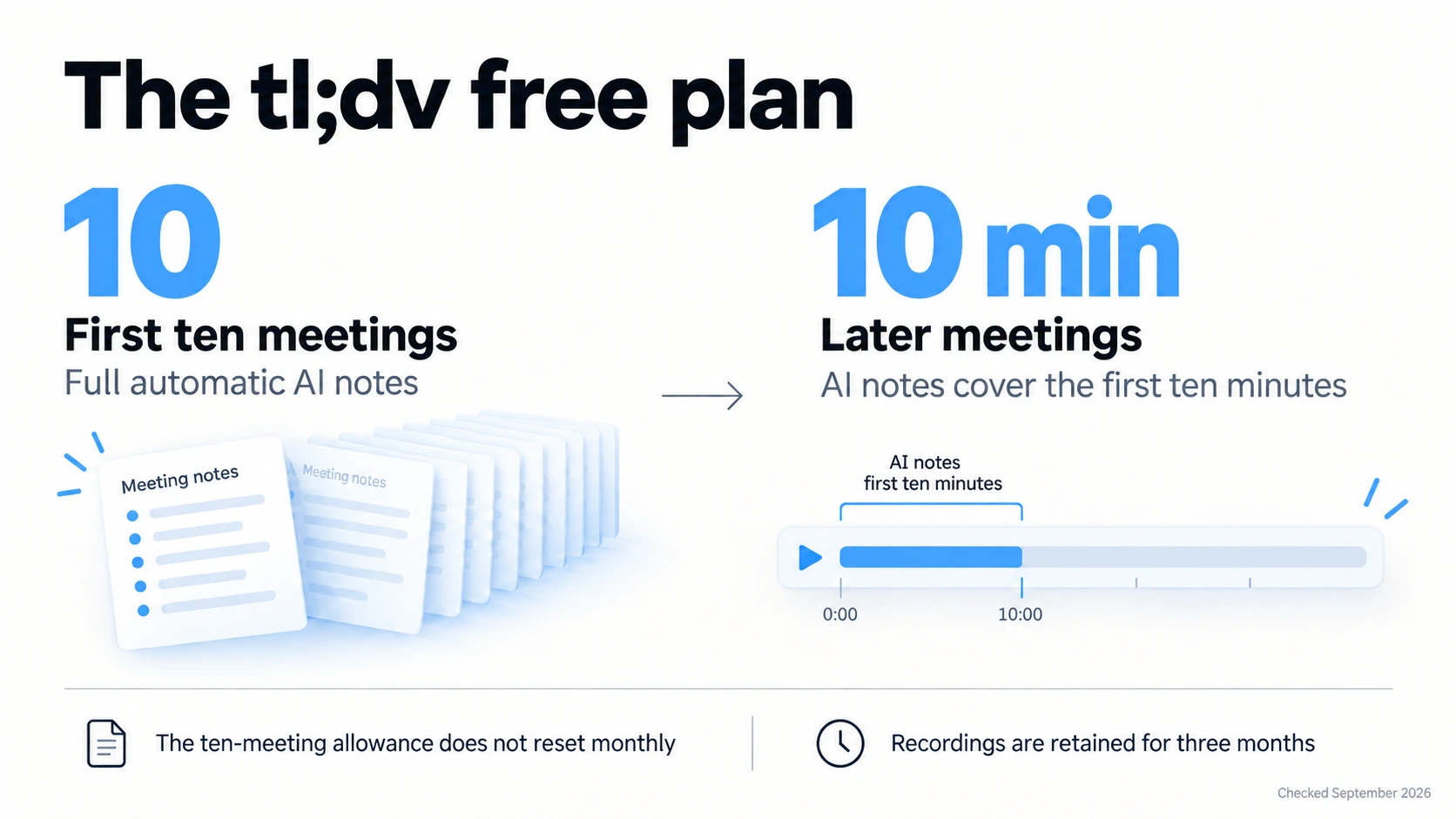
tl;dv offers free recording and transcription, but the allowance for complete AI notes is limited. Its free-plan documentation says the first ten meetings receive full automatic AI notes. After those are used, the notes cover only the first ten minutes of each meeting. The ten-meeting allowance does not renew every month.
At five recorded meetings a week, you would use that allowance in two weeks. You can continue recording, but you would need to work from the transcript or recording to recover anything missing from the shorter notes. On a sales call, that could include the next steps agreed towards the end, which are often the part I need most afterwards.
Free recordings are retained for three months and moved to archived storage after three days. Watching an archived video requires unarchiving it, which can take up to 90 minutes. Notes and transcripts remain accessible during that wait.
There is also a restriction if you want to keep your own copy. According to the same documentation, free-plan recordings can only be downloaded during the four weeks before their scheduled deletion. It says that restriction still applies to recordings made on Free even if you later have Pro. I would check this before relying on the free plan to keep a customer's product walkthrough for a longer sales cycle.
Sharing clips has a separate allowance. You can create and share four clips on Free, and those clips cannot be downloaded. That gives you a way to try sharing a short exchange with a colleague, but it is a small allowance if you want to do this regularly across customer calls.
I would use the free plan to see whether the workflow suits me. If I were planning to rely on full AI notes after every customer call, I would include a paid subscription in the decision from the beginning. I would also check whether the recording retention covers the length of my sales cycle before treating it as a customer archive.
The Coaching Needed More Useful Detail
My main issue with the coaching was that I wanted a clearer explanation of where I could improve. Seeing how a call compares with a playbook can help a manager identify something to discuss, but as the rep I also need to understand which exchange I mishandled and why.
For example, imagine a prospect says they are worried their team won't use another piece of software. The rep explains that the product is easy to set up. That answer might be relevant, but the concern could come from a previous rollout where nobody took responsibility for adoption. Without asking about it, the rep doesn't know whether they have answered the concern at all.
Useful feedback would point to that exchange and explain why a follow-up such as “What made the last rollout difficult for your team?” would have helped. The rep could then find out whether the problem was setup, ownership or something else before deciding how to respond.
My discovery call guide has more examples of questions that help you understand the buyer’s situation.
That is the level of guidance I wanted more of from tl;dv. I could see the purpose of its coaching features, but the feedback could have been much more informative about what I should change in similar situations.
If you are evaluating the coaching, I would review a call you remember well and choose an exchange you found difficult. Check whether the feedback identifies the actual issue and gives you a question or approach you could use next time. That is a more useful test than accepting a score without understanding what led to it.
Why I Prefer Help During the Call
Even detailed feedback arrives too late to change the conversation you have just had. You can learn from it, but I would also like help while the buyer is still there and I can ask them to explain something.
In the adoption example, a relevant prompt could remind me to ask about the previous rollout before continuing with the demo. I still need to listen and decide how to respond, but it would help me explore a concern that I might otherwise answer too quickly. I didn't get that kind of useful assistance from tl;dv during my calls.
This is where Convo is more relevant to how I work. With Ask AI, I can request help with a response or follow-up based on the live conversation, without typing out everything the buyer has just said. That is included in Starter. Professional adds proactive assistance that can suggest a response when a buying signal or objection comes up, along with support from company knowledge when relevant product information is needed.
Try Convo on your next sales call.
Try Convo on a sales call where you would normally have to think through a buyer’s concern alone, and see whether the suggested response helps you continue the discussion. Compare Convo’s plans.
Leaving With the Questions Answered
There is also the question of what remains unanswered. A discussion about implementation can go well without establishing who approves the purchase. Convo’s live sales playbooks capture answers from the conversation and keep the open questions visible, so I can return to approval before we finish. You can use your own questions or adapt frameworks such as BANT, SPICED or MEDDPICC on Professional and Enterprise.
For me, the value is leaving with a better understanding of whether the deal can move forward. If I know how the decision will be made, I can agree on a next step that fits the buyer’s process instead of sending a follow-up email to ask something I missed.
We are building Convo around these situations because they affect what happens to the opportunity. If you recognise them from your own calls, try Convo and judge whether the help is relevant enough to use while you are speaking to a customer.
Pricing and Choosing a Plan
tl;dv’s pricing page displayed €18 per seat per month for Pro and €29 for Business when checked for this review on 29 September 2026. Both are monthly equivalents with annual billing.
Pro covers the fuller notes and reporting workflow. Business adds capabilities such as playbook monitoring, scheduled reports and team-wide automation. If you mainly need complete notes from your own calls, I would start by looking at Pro. The case for Business depends more on whether you will use its tools to review calls across a team.
Convo Starter is $29.99 per month, or $22.49 per month billed annually. Professional is $69.99 monthly, or $52.49 per month billed annually. Convo’s prices are in USD, while the tl;dv prices above are in EUR.
Starter includes on-demand Ask AI, so you can request help when you need it. If you want proactive suggestions, answers supported by company knowledge and live qualification playbooks, those require Professional. I would choose based on how much assistance I wanted during calls and whether I preferred to ask for it myself.
My Verdict on tl;dv
tl;dv is worth considering when your main need is to record customer conversations and make them available for your team to review. I can see the value for a manager who wants to hear what happened in calls they didn't attend.
For my own sales calls, it fell short of what I wanted. The desktop app was too limited, the change from bot-free audio to bot-based video was frustrating, and the coaching could have explained more clearly where I should improve.
I would choose Convo because I want help while I can still do something about a concern or an unanswered question. I am its founder, so that preference also reflects what we are building. If you are comparing the two, spend some of your trial on a difficult customer conversation and look at which help you actually use. For tl;dv, that means checking the quality of the review afterwards. For Convo, it means seeing whether the assistance helps you ask a useful question before the call ends.
For other tools you can use during a call, my AI sales call assistant comparison for individual reps covers Convo, Hedy, Cluely and Fireflies.
You can also read other users’ experiences on G2 to see whether they use tl;dv for similar work.
Frequently Asked Questions
Is tl;dv worth it for sales calls? It is worth considering if you need to record and share customer conversations or review calls across a team. I wanted more specific coaching and useful help during the conversation, which is why I prefer Convo for my own sales calls.
Does tl;dv have a desktop dashboard? The desktop app I used let me start recordings, but didn't offer the dashboard or broader meeting workspace I expected. I had to use the web product for those parts of the workflow.
Can tl;dv record without a bot? Yes, the desktop app supports bot-free audio capture. It does not include video or screen sharing, and the video-recording workflow I used required a bot to join.
Do tl;dv’s free AI notes reset every month? No. The ten full-meeting AI-note allowance is a lifetime limit. After that, automatic notes cover the first ten minutes of each meeting.
Does tl;dv offer sales coaching? Yes, including playbook monitoring, objection analysis and speaker insights. In my experience, the feedback could have been more informative about where to improve and how to handle similar exchanges in future calls.
Which Convo plan includes help during a call? Starter includes on-demand Ask AI. Professional adds proactive assistance, company knowledge and live sales playbooks, so the choice depends on whether you want to request help yourself or also receive suggestions as the conversation develops.
Markus is the founder of Convo, building an AI meeting assistant that automates everything after the call. Years of experience building AI products. Believes technology should help people in the moment, not just analyze the past.
Ready to transform your meetings?
Join professionals using Convo to feel confident in every conversation.
Get StartedCONTINUE READING