

Markus Kellermann Founder & CEO
The Memory Layer for Every Sales Conversation
Markus Kellermann Founder & CEO
Convo just shipped Convo Memory, the Live Insights Playbook (BANT today, more frameworks next), and a rebuilt Feedback tab with detailed conversation intelligence.
What shipped this week
Three things landed in Convo this week. Convo Memory remembers what you discussed last time with every contact and shows that context before your next call. The Live Insights Panel puts your discovery framework on screen during the call and ticks off questions as the prospect answers them. The Feedback tab got a full rebuild that routes growth notes back into the next live call instead of leaving them in a dashboard.
Memory across calls has been the longest-promised piece of Convo. Until this release we had good transcripts and decent summaries. What was missing was the layer that turns those into memory across calls. Phase 1 of that layer is what just shipped.
Most AI meeting assistants on the market in 2026 (Fireflies, Grain, Fathom, Avoma, Read AI) handle transcripts and post-call summaries well. What the category was missing was a memory layer that surfaces past calls during a live call, not just after it. Convo's version of that is now live.
This post walks through what each piece does, plus what is still on the roadmap this year.
1. Convo Memory: The Cross-Call Brain
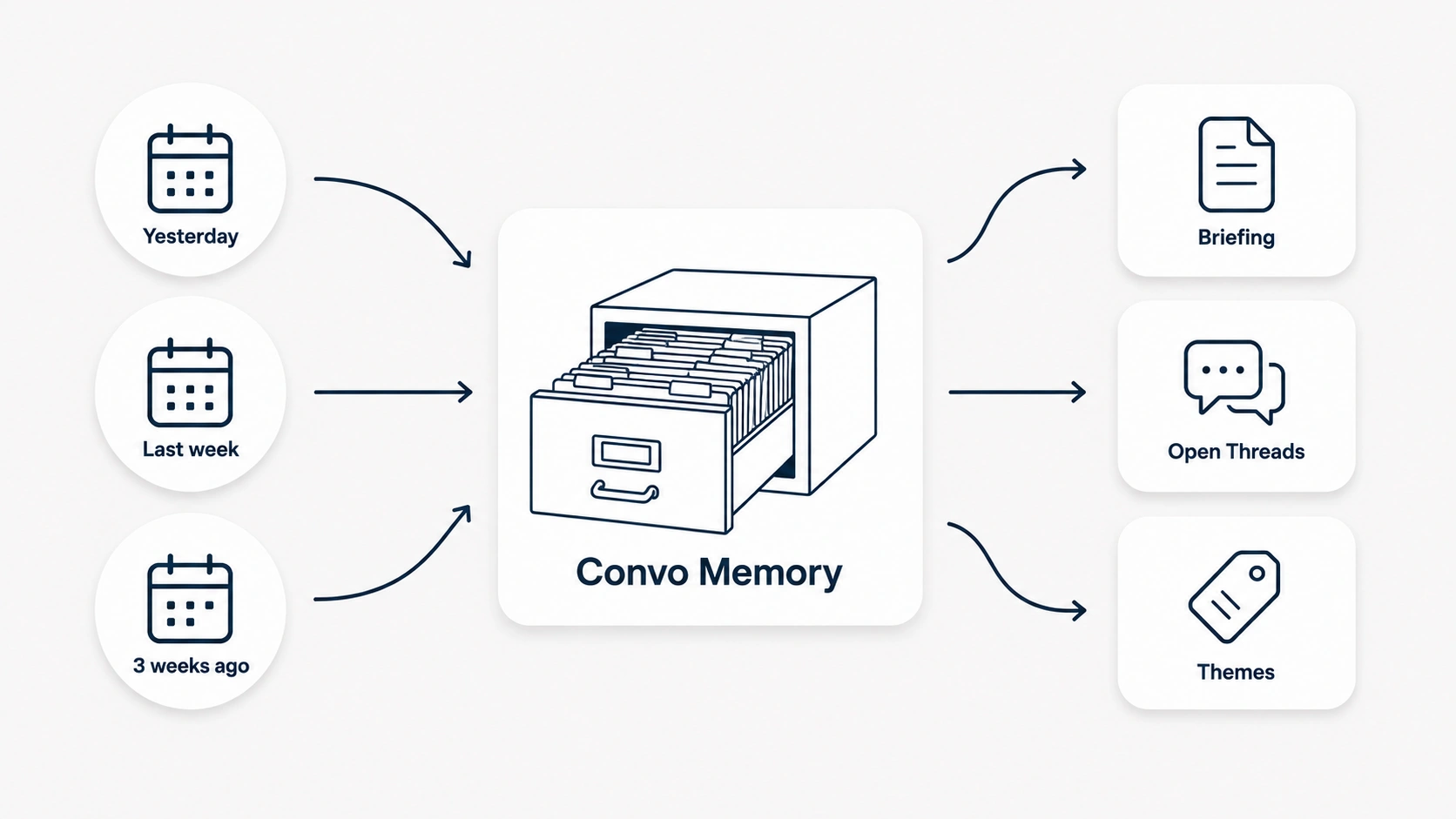
Convo now remembers what was discussed in every past call with every contact. Open the dashboard before your next meeting and the briefing is already there. Hover the calendar event and a popover surfaces who you are meeting with, what you discussed last time, what action items are still open, and the themes that keep coming up. The brief takes a few seconds to read depending on the number of interactions with the person. Until last week, that same context took twenty minutes of scrolling through past summaries trying to remember what mattered.
We tried to mirror how humans actually carry relationships across time. You do not remember every word from every meeting with someone. What you remember are the core characteristics of relationships: Sarah always opens with budget, that Carlos cares more about implementation timeline than features, that the marketing director at Intel keeps coming back to technical integrations. That kind of pattern matching is how human memory of relationships actually works. Convo Memory does the same thing, just from transcripts rather than gut feel.
A new Cooling Contacts section on the Overview tab (part of the Knowledge tab in dashboard) shows people you have not spoken to in a while. The way I used to notice a relationship going quiet was the prospect bringing it up. Now I see it three weeks earlier and send the note before it gets weird.
During the call itself, the memory loads in the background the moment Convo resolves who you are talking to. Real-time suggestions can now reference past commitments without you saying anything. When a client mentions a pain point they raised six weeks ago, Convo shows the exact quote on your screen.
What this looks like by role:
| Role | What changes |
|---|---|
| Sales teams | Long discovery cycles stop punishing you. Three weeks between a discovery call and a procurement review used to mean you walked into procurement with limited context. |
| Customer success | Customer context grows. Every time a customer re-raises a pain point, Convo will remember it. You stop treating each ticket as new and start seeing the pattern across months of conversation. |
| Recruiters | Candidate context survives across rounds. Round three opens with the verbatim quotes from rounds one and two, not your memory of what they said. |
| Consultants | Engagements that resurface weeks apart pick up where they left off. The week-eight kickoff includes what was said in week one without you re-reading the notes. |
If Convo misses the auto-detection on a back-to-back call, or you start a recording outside any calendar event window, you can link the conversation to the right calendar event from your dashboard after the fact. Memory rebuilds against the attendees of that event. The same works in reverse: unlink a recording from an event and Convo quietly forgets that meeting from those contacts. Any miss is fixable without losing the context.
The four-attendee cap. Convo only builds memory for calendar meetings with four people or fewer (including you). For meetings with five or more attendees, the meeting still saves and transcribes like any other, but no contact summaries get updated. The reason is honest. Convo's transcription tells "You" from "Participant" but does not yet identify which specific person spoke when several people are on the call. In a five-person discussion, attributing a comment to a specific attendee would be a guess. We would rather skip the meeting than learn the wrong thing about someone. Speaker-level transcription is on the roadmap.
What Memory learns. For each known contact, Convo tracks what they keep returning to across calls, what is still open between you, what has been decided, and questions they raised that have not been answered. This is what surfaces in pre-call briefings, the Ask AI prompt during live calls, and the contact's detail view.
What it looks like in a real briefing:
- Sarah's team raised budget concerns in week one. Procurement is in today's meeting for the first time.
- The Acme team keeps circling back to integrations across the last six conversations.
- Carlos last asked about implementation timeline in November. He has not raised it since.
- Maria's open thread from three weeks ago is pricing for the EU rollout. Still unanswered.
Each of those is the kind of detail a good account manager would carry in their head about an important account. Convo carries it for every contact, from the first meeting onward.
What's gated. Memory is Pro and Enterprise only. The Starter tier no longer mentions "basic memory" on the pricing page, which was a placeholder from when this layer did not yet exist.
Privacy and controls. A master toggle and Forget All button live in Settings, alongside a "Make Convo yours" personalisation field for your role and the themes you want surfaced. Personal contacts and calendar events without an actual recording are automatically excluded. The full rules and the workarounds for walk-up calls and missed auto-detection are in the help-centre page on Convo Memory.
2. Live Insights Panel: Your Playbook on Screen
A new Playbook panel opens next to your call window during the call. The four BANT sections (Budget, Authority, Need, Timeline) appear on screen, each with the questions to cover. As the prospect answers each one, Convo writes the answer into the right field and strikes through the question. By the end of the call you know exactly what got covered and what is still open.
We considered an emergent version where the AI watches the conversation and surfaces what feels relevant without a fixed checklist. Customer testing was clear: structured sales motions, new reps, and managers all want the framework on the screen.
For a sales rep, you stop trying to remember whether you asked about budget while you are also listening for the answer and focusing on the conversation.
What is on the roadmap. SPICED, MEDDPICC, and a custom playbook editor are next. If your team runs SPICED or MEDDPICC, or a custom BANT variant with an internal-champion check or a competitive-mention field, write to us and tell us which fields matter most. For today: BANT, on screen, auto-filling while the call is happening.
The Briefing accordion at the top of the Playbook tab pulls the Convo Memory briefing for whichever event you are on. One click expands the past context. One click switches the meeting if Convo guessed the wrong one. Memory and Playbook talk to each other now rather than living in separate tabs you flip between.
3. Rebuilt Feedback Tab: Specific, Anchored, Actionable
The Feedback tab got rebuilt from scratch. Before we started, I spent a week reading roughly fifteen external sources on what reps and managers actually want from post-call feedback: sales rep reviews, manager perspectives, customer success literature, recruiter interview-feedback guides, and behavior-change research.
Every source agreed on the same five fundamentals. Feedback has to be specific and anchored to a moment in the call ("you talked over the prospect at 4:30" beats "be more consultative"). It has to include a verbatim alternative ("try saying X instead" beats "consider listening more"). It has to cap at three focus items, because behavior-change research is unanimous that more than three and the rep cannot hold it all in their head between calls. It has to lead with positive feedback, because growth notes land worse when they come first. And it has to integrate into the workflow rather than living in a dashboard the user has to consciously visit. RepsMate's exact phrasing: "Reps do not have time to interpret dashboards. If AI does not fit directly into their workflow, it gets ignored."
Here's the breakdown of the new feedback tab:
What went well shows strengths from the call as chat bubbles. Each bubble has the rep's avatar, a verbatim quote from what they said, and a short reason explaining why it worked. Specific moments, specific reasons.
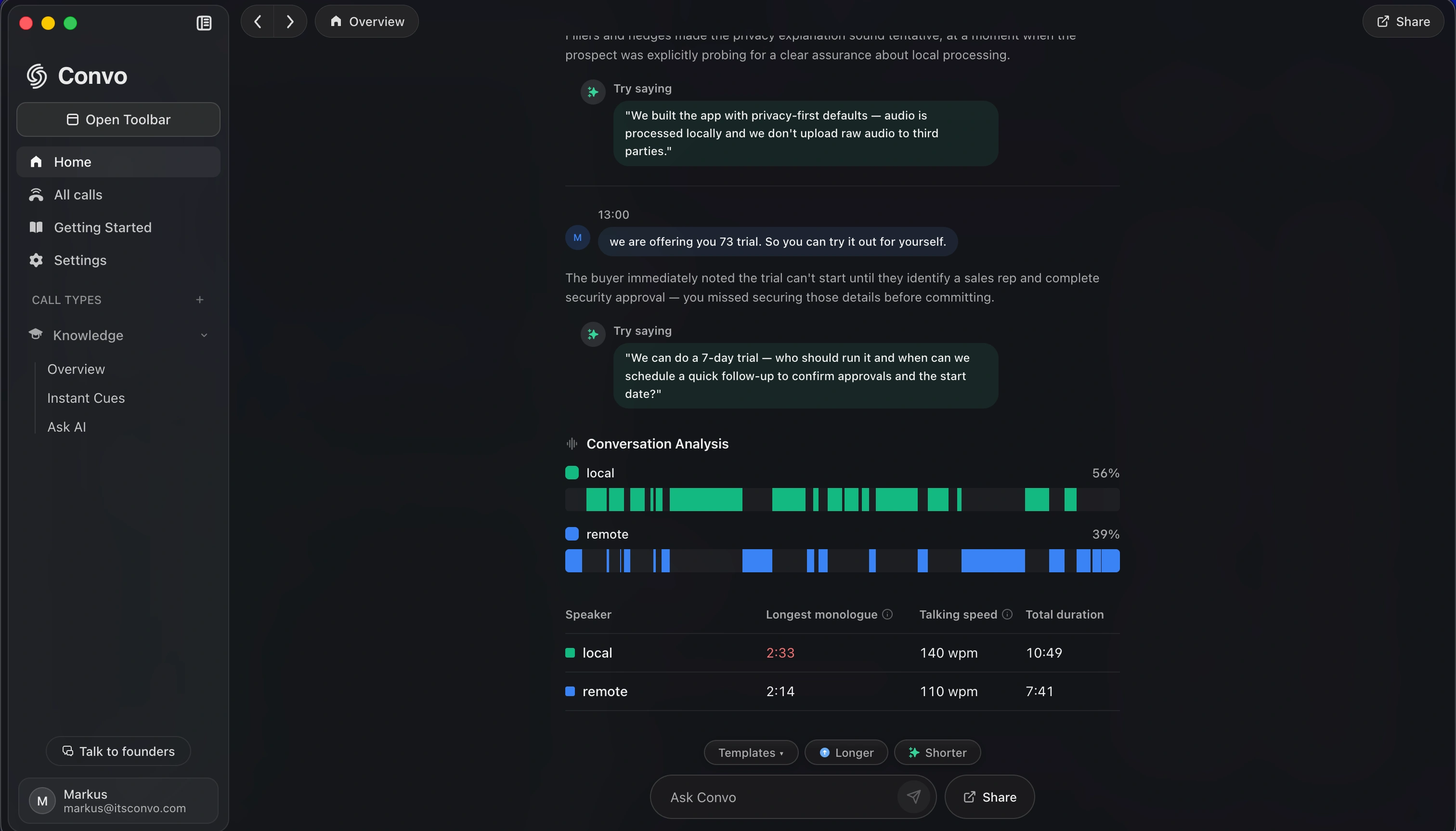
Areas for improvement uses the same format with one addition: a "try saying" callout in green with a specific alternative phrasing. Where the old version said "be more consultative," the new version says "try saying X at moment Y." The alternative is concrete enough to use on the next call.
Conversation Analysis shows a per-speaker Gantt timeline of who talked when, plus a stats table: longest monologue, words per minute, total talk time. Flags fire above 2:30 of unbroken monologue or 175 WPM. The numbers show the diagnosis, and the chart shows when it happened.
The piece that closes the coaching loop is Save as Cue. Hover any feedback bubble and click the button. Convo turns the line into a structured cue: a question, a when-it-applies, and a then-say. The cue stores in your account. The next time a similar moment happens in a live call, the cue fires through Convo's real-time help layer. Feedback from this call shows up as live help on the next call.
Two other things are deliberate.
Capped at three. No 10-item lists that get ignored. Behavioural-change research is clear: more than three focus items and reps cannot hold it all.
Positive first, always. Reduces defensiveness. Makes the growth section actually land.
Who benefits most. Reps trying to fix specific habits. Managers running 1:1 coaching from real call data instead of memory. Sales enablement teams systematically improving rep performance.
How the three pieces fit together
The three pieces feed each other. Memory captures what was said across past calls. The Playbook captures structured data while it is being said in the current call. The Feedback tab routes growth notes from this call back into the next one as a live cue.
A working example: a prospect mentions a pricing concern in week one and Memory captures it. Week three, you are in the close call. The pricing concern surfaces on screen the moment pricing comes up again, and you respond using the prospect's own past words. Post-call, the Feedback tab flags that your close ran twelve seconds too long and saves "try saying X instead" as a cue you can use in the next close. Week six, in a different close with a different prospect, a similar moment hits. The cue fires on screen with the alternative phrasing.
This is the loop we wanted memory across calls to actually run. Until this release it was open at one or two points. Now it closes.
The three pieces together form Convo's conversation intelligence layer: real-time on the call, structured memory across calls, post-call coaching that routes back into the next conversation. This is a different category from the revenue intelligence platforms that focus on pipeline forecasting and deal scoring. Conversation intelligence works inside the conversation; revenue intelligence works on the pipeline that contains it. For the wider category framing of what conversation intelligence actually buys you in 2026, and the patterns conversation analytics actually predicts about call outcomes, the two separate guides cover the broader picture.
The bottom line
If you have been using Convo mostly for transcripts and post-call summaries, this release is where the product becomes a memory tool. The first time a prospect references something from six weeks ago and the exact quote surfaces on your screen, you will get it.
If you are already a Pro or Enterprise customer, Memory turns on automatically as we roll it out account by account. Your existing app picks it up on the next launch. If you do not see Memory after restarting, write to us and we will enable it on your account.
Questions, edge cases, or feedback on the rollout: write to us. We read every message.
Frequently Asked Questions
Is Convo Memory on by default? For Pro and Enterprise users, yes. We control rollout via a per-user flag so we can pace it. If you are Pro or Enterprise and don't see Memory after restarting the app, write to us and we'll enable it on your account.
What does Convo Memory remember and what does it skip? Memory remembers conversations from meetings you record with Convo. It skips automated bot invites, personal contacts, and calendar events without an actual recording attached. The full rules are explained in the new help-centre page on Convo Memory.
Can I turn Memory off? Yes. Settings has a master toggle and a Forget All button that wipes contacts while preserving your bio and themes. You can also delete individual contacts via the Contact Detail view.
Which methodologies does the Live Playbook support? BANT today. SPICED, MEDDPICC, and a custom playbook editor are on the roadmap for the next release. If your team runs a specific framework and wants it prioritised, write to us.
How is the new Feedback tab different from the old one? The old version produced generic feedback with too many items. The new version anchors every note in a verbatim quote, caps focus items at three, and lets you save any growth note as a Cue that fires in your next live call. The whole tab is built around the research on what reps actually use versus ignore.
Is the data private? Yes. Convo audio is captured locally on your device. Memory data is stored in your account, not on third-party servers. The same privacy guarantees that applied to recordings apply to the memory layer built on top of them.
Markus is the founder of Convo, building an AI meeting assistant that automates everything after the call. Years of experience building AI products. Believes technology should help people in the moment, not just analyze the past.
Ready to transform your meetings?
Join professionals using Convo to feel confident in every conversation.
Get StartedCONTINUE READING